YouTube Tags Are Dead in 2026: What to Focus On Instead
YouTube tags are dead as a primary discovery lever in 2026. Tags are not SEO, not keywords, and not hashtags. Here is what to focus on instead, from someone who taught tags for a decade.


Almost every week somebody in the Kan Do Creators Community Discord tells me some version of the same line. "I've done my SEO, I've got my tags." It is the most expensive misunderstanding on the platform, and it is worth settling once. YouTube tags are not SEO. YouTube tags are not keywords. YouTube tags are not hashtags. And the tag field inside YouTube Studio has not been a primary discovery signal for years.
I should know how far the tags field has fallen, because I spent a decade teaching it. More on that below. I broke the whole thing down in the livestream here, and there is a shorter version near the bottom of this post if you would rather watch the tight cut than the full conversation. First, the part that matters for your next upload.
What YouTube tags actually do in 2026
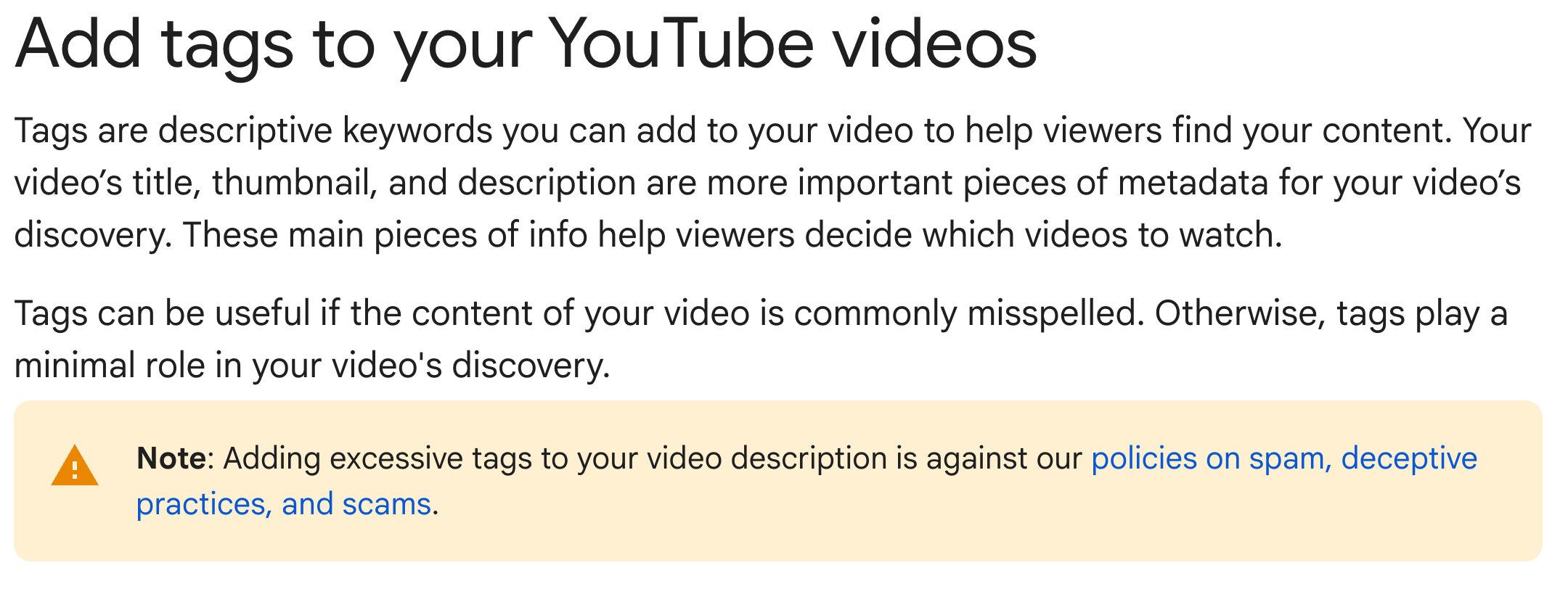
YouTube tags are a private metadata field inside YouTube Studio where you list descriptive keywords to help the platform understand the video. They are not visible to the viewer, and YouTube's own help documentation is blunt about their weight. Tags "play a minimal role in your video's discovery" and are mostly there to catch common misspellings. The industry ranking-factor studies agree, putting tags at the bottom of the stack beneath the title, the thumbnail, the description, the transcript, and watch time. The tag field is a misspelling-correction tool wearing the costume of an SEO lever, and the moment you see it that way, the rest of your strategy gets a lot clearer.
The donut-and-sprinkles analogy
Picture a donut shop on a busy street, because this is the analogy I keep coming back to inside KDCC, and it maps onto YouTube cleaner than any jargon does.
The donut itself is your video, the actual thing people came for. The recipe is your keyword and your idea, the reason the donut is worth making in the first place. The display case in the window is your title and thumbnail, the thing that decides whether anyone walking past slows down. The hand-lettered sign is your description, the few lines that tell a curious passerby what they are looking at. The conversation the owner has with every customer who steps inside is your transcript and your chapters, the part the customer actually remembers and the part that decides whether they ever come back. And the sprinkles on top are your YouTube tags.

Here is the part most creators miss. The sprinkles are the last thing you add and the first thing people forget. Nobody has ever walked past a shop, spotted the sprinkles through the window from across the street, and crossed traffic to get inside. They came for the donut. They slowed down for the display case. They stayed for the conversation. The sprinkles were a nice touch they noticed only after they had already decided to buy.
The analogy is also a diagnostic, and this is where it earns its keep. If a lot of people walk past your shop and nobody slows down, the problem is the display case, which means your title and thumbnail are not doing their job. If people stop and look but never come inside, the problem is the donut itself, which means the idea is not landing. If people come in, buy once, and never come back, the problem is the conversation, which means the video did not deliver on what the window promised. None of those three failures is fixed by changing the sprinkles. A creator who answers every one of those problems by reaching for the tag field is a creator rearranging sprinkles on a donut that was never baked, in a shop with an empty window, wondering why the street stays quiet.
YouTube tags vs. keywords vs. hashtags
These three get used interchangeably, and that confusion is the root of the whole problem. Keywords are the focus of the video, the phrase a real person types into search, and they belong in your title, your description, and the words you actually say on camera. YouTube tags are the private Studio field, used sparingly for misspellings and genuine ambiguity. Hashtags are the public pound-sign markers on the watch page, capped at sixty before YouTube ignores the rest. Three fields, three jobs. The creator who keeps them straight stops fixing the wrong field on every single video.
Did I really used to recommend YouTube tags?
Yes. I was the first employee at TubeBuddy, more than a decade ago, back when YouTube's machine learning could not reliably read what you said on camera. Auto-captions were a mess, transcripts were not a recommendation signal, and tags were one of the few structured inputs you could feed the algorithm. So I taught tags. I made videos about tags. I built tooling around tags. That was correct advice for that era.
Then the platform changed. Auto-transcription got accurate. Auto-dubbing arrived. Generative engines started quoting transcripts. The value of the tag field dropped through the floor, and when the data changed, I changed the advice. That is the job. I am not loyal to a tactic. I am loyal to creators getting found. Anyone still calling tags a primary growth lever in 2026 has not updated their thinking since maybe when YouTube Rewind was still a thing.
What you should focus on instead
The discovery work tags used to do did not vanish, it moved, and it moved into five places worth far more of your time than the tag field will ever return. Here is where to put the hour you were about to spend on tags.
Start with the idea, because it is the donut and nothing downstream can save a weak one. Before you record, you should be able to say in one sentence what specific problem the video solves, what feeling it creates, or what outcome it promises. If you cannot, you do not have a video yet, you have a topic.
Then the title, which is the single highest-leverage piece of metadata you control. Put the keyword in the first few words, because the mobile app truncates titles hard, and promise something specific rather than something vague. The most interesting word should sit near the front, not buried at the end where the phone cuts it off.
Then the thumbnail, which works as a unit with the title and should never just repeat it. One clear focal point, high contrast between the subject and the background, readable emotion, and at most a few words of text that add what the image cannot carry on its own. Review it at the actual size YouTube serves it on a phone, because that small frame is where most people will ever see it.
Then the description, which has quietly become one of the most valuable fields on the platform. The first two lines sit above the fold, so use them to reinforce the keyword and answer the searcher's question fast. Write the rest in real sentences, because AI summarizers and Google's overview surfaces quote the description directly. Do not paste tags into it.
Then the transcript and chapters, which is the part most creators are still sleeping on. YouTube reads every word you say now, and so do ChatGPT, Gemini, and Perplexity. Say your keyword out loud, define your terms, and upload a cleaned transcript rather than leaning on raw auto-captions. Label your chapters clearly so the platform can treat them as searchable segments. A 2025 analysis credited long-form YouTube videos with over five hundred thousand AI citations across the major engines in a single year, and every one of those citations came from a transcript, not a tag.
Inside KDCC we run all of this through the KANDO Method. Knowledge, research the gap before you record. Audience, define one viewer per video. Novelty, find the angle nobody else hit. Data, read impressions, click-through rate, and watch time, then make one decision. Optimization, the title, thumbnail, description, chapters, transcript, and yes, tags, dead last. SEO is K plus A plus N plus D plus O. Tags are a single line item buried under the O. The free KANDO Method worksheet walks through each step, and I break the whole framework down in both videos on this page if you would rather watch than read.
For the keyword research the tag field cannot do for you, the tools are free and already in your hands. The Research and Inspiration tabs inside YouTube Studio show you what your audience is searching for right now, including searches with high demand and low competition. Google Trends with the YouTube filter shows you which phrasing is rising and which is fading. And the YouTube search bar's own autocomplete shows you the exact words real viewers type. Do that research first, and your title, description, and transcript fill themselves with the right words.
How many YouTube tags should you use?
YouTube give you 500 characters so ideally YouTube tags should include the title, your channel name and ways to describe the video, misspelling, and again your best to fill them up, but they don't move the needle. ALSO don't stuff YouTube tags in the description of your videos... That is against YouTube's spam policy and risks a penalty rather than a boost.
Prefer the shorter video breakdown?
Short on time? The shorter version below covers the same framework in a fraction of the runtime, for the creator who needs the answer before the next upload goes live.
The one-line summary
SEO is the process, keyword ideas are the foundation, the title, thumbnail, description, and transcript are the walls, roof, windows and YouTube tags are the houses siding. Reorder your workflow so tags come last, and you stop chasing the wrong signal and start having an actual conversation with the SEARCHERS of SEO aka audience
If I Kan, You Kan Too.
YouTube Tags FAQ
Are YouTube tags dead in 2026? As a primary discovery lever, yes. YouTube's own documentation says tags play a minimal role in discovery, the ranking studies put them at the bottom of the stack, and the AI engines driving external traffic do not read the field at all.
What is the difference between YouTube tags, keywords, and hashtags? Tags are a private Studio field. Keywords are the focus of the video, living in the title, description, and spoken script. Hashtags are public pound-sign markers on the watch page. Three fields, three jobs.
How many YouTube tags should I use? Five to eight, two to three words each, most important first. Tags past the eighth slot return effectively nothing.
Should I delete my tags? You do not have to. Keep a small handful of accurate ones, and spend the time you used to spend tag-stuffing on the title, description, and transcript instead.
Can stuffing tags into my description hurt me? Yes. It is against YouTube's spam, deceptive practices, and scams policy and risks a penalty.
Where should I focus instead? The idea first, then the title and thumbnail, then the video itself including the transcript and chapters, then the description and a small handful of tags at the very end.
Further reading from YouTube
YouTube Help Center: Add tags to your YouTube videos, the platform's own definition, with the statement that tags play a minimal role in discovery.
YouTube Help Center: Spam, deceptive practices, and scams policies, the documentation behind the tag-stuffing rule above.