YouTube Studio Mobile App vs YouTube Desktop: Stop Relying on the App for Analytics
The YouTube Studio mobile app is built for a quick glance, not full analytics Here is what it cannot do, what Advanced Mode unlocks on desktop, and the browser trick that runs the full desktop Studio on your phone.

The YouTube Studio mobile app is built for a quick glance, not for deep YouTube analytics analysis, and that is the trap most creators fall into. The app is great for checking a view count between meetings or replying to a comment from the couch, but it hides the tools that actually help you grow. It does not have Advanced Mode. It does not let you set a custom date range. It cannot export a report, and for some metrics it only shows you a flat percentage instead of a chart you can read over time. The desktop version of YouTube Studio at studio.youtube.com has all of that. The part almost nobody uses is that you do not need a computer to reach it. You can open the full desktop Studio right on your phone by loading the site in a mobile browser and turning on Request Desktop Site.
After more than a decade on YouTube, and five years helping grow TubeBuddy's channel from around 6,000 to over 530,000+ subscribers, I have watched a lot of creators make every decision from the mobile app and wonder why the picture never gets clearer. The numbers are not the problem. The version of Studio you are reading them in is the problem.
This post covers why the mobile app is not enough, what it can and cannot do, what Advanced Mode adds, and the browser trick that runs the desktop experience from your phone.
In this guide:
- Why should you stop relying on the YouTube Studio mobile app for analytics?
- What can the YouTube Studio mobile app actually do?
- What is Advanced Mode in YouTube Studio?
- What does Advanced Mode unlock that the mobile app cannot?
- How do you open the desktop YouTube Studio on your phone?
- Think of it like your channel's report card
- Did I used to tell creators the app was enough?
- Where this fits in your weekly routine
- YouTube Studio analytics FAQ
Why should you stop relying on the YouTube Studio mobile app for analytics?
Because the app was designed to keep you informed, and not really to help you investigate. Those are two different jobs.
When YouTube built the Studio mobile app, the goal was speed. Open it, see how a video is doing, answer a few comments, close it. That is a useful job, and the app does it well. The trouble starts when the app becomes the only place a creator ever looks. You end up making strategy decisions with a fraction of the data, because the app quietly leaves the deeper tools out. You are not doing anything wrong. You are just reading a summary and treating it like the full report.
The clearest example is the date range. The mobile app locks you into preset windows. If you want to compare this month to the same month last year, or line up two specific videos over the exact same seven days, the app cannot do it. Advanced Mode on desktop can. That single limitation changes how much you are able to learn, because almost every real insight comes from comparing one period, or one video, against another.
Another thing I will tell you is over my years doing this SO Many people tell me they check analytics, but really it's just the Studio Mobile app, and when I ask them to pull it up on a laptop they're BLOWN away by the depth. Again I want you to REALLY use all options available to you, even if you're a shorts only creator you can find more depth on the desktop app!
What can the YouTube Studio mobile app actually do?
Quite a bit, as long as you treat it as a dashboard and not a laboratory.
The app is good for the daily pulse. You can see your recent views, your subscriber movement, your top videos, real time numbers for the last 48 hours, and a quick read on how a new upload is landing. You can respond to comments, check revenue if you are monetized, and get the gist of where viewers are coming from. For a morning check-in, that is plenty.
The app even has one analytics view that desktop does not, which is worth knowing about. If you want to see how other people are remixing your video into their own Shorts, the Remix analytics live in the mobile app. So this is not a case of the app being useless. It is a case of the app being the wrong tool the moment you stop asking "how is it doing" and start asking "why." As of mid 2026 these menus shift around fairly often, so treat the specifics here as a map, not gospel, and confirm the exact labels in your own Studio.
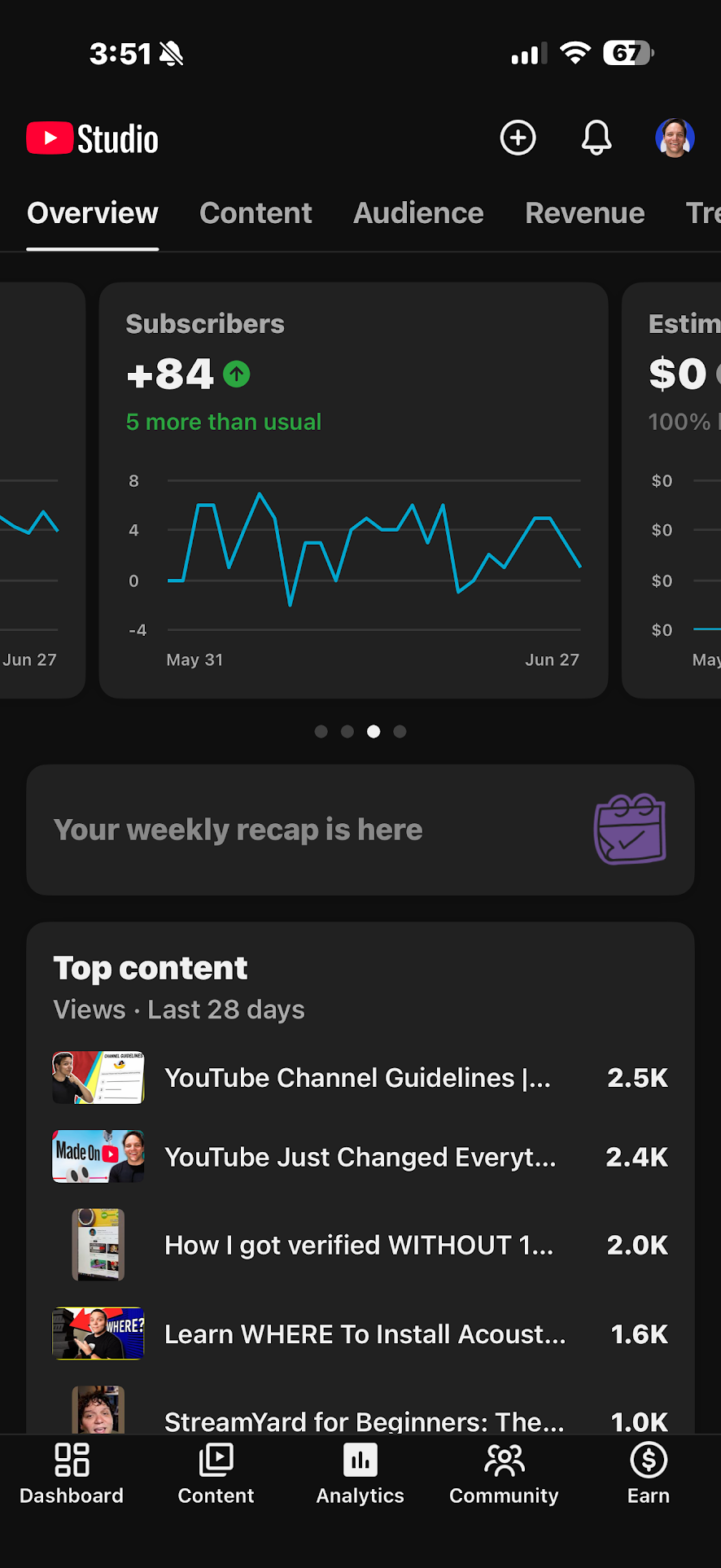
Fast for a daily check, but notice there is no Advanced Mode and no custom date range.
What is Advanced Mode in YouTube Studio?
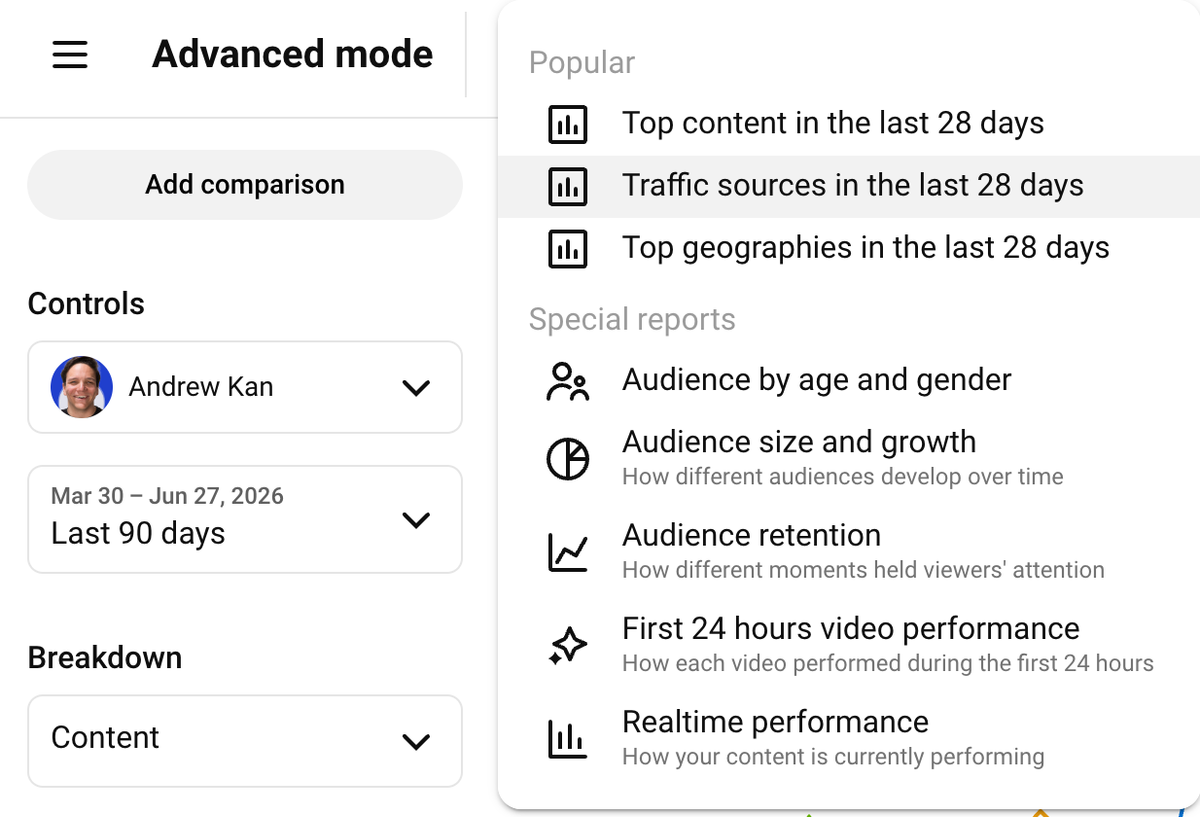
Advanced Mode is the full analytics workbench inside the desktop version of YouTube Studio. You reach it from the Analytics page on desktop, where there is an Advanced Mode button in the top right corner. Click it and the friendly summary screen turns into a proper data tool.
Instead of a handful of cards, you get every metric YouTube tracks, laid out as a table you can sort, filter, and compare. You can pull in any combination of videos, set any date range you want, group content by type, and stack two time periods side by side. This is the same surface that the analysts behind big channels live in, and it is sitting in your account right now, on the desktop side, whether you have opened it or not.
Advanced Mode on desktop. The Advanced Mode button sits in the top right of the Analytics page.
What does Advanced Mode unlock that the mobile app cannot?
This is where the gap between the two versions stops being a minor inconvenience and starts costing you real understanding. Desktop Advanced Mode gives you several things the app does not.
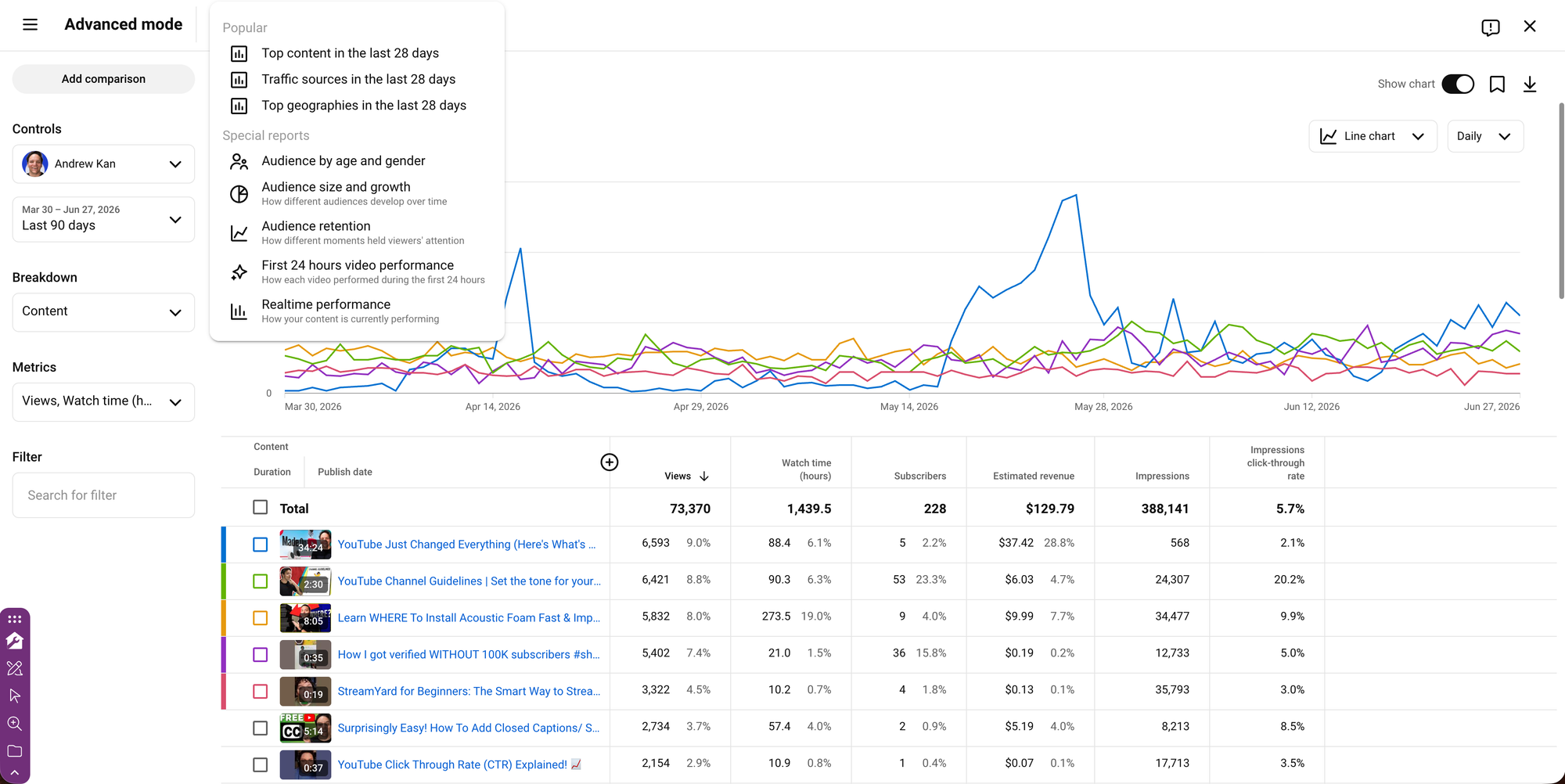
You get custom date ranges, so you can compare any period to any other period instead of being stuck with presets. You get true side by side comparison, so you can line up two videos, or two months, or your last five uploads, and actually see the pattern. You get the full retention picture, including the "Audience Retention Compared to Other Videos" view that tells you where your video beats or trails similar length content across YouTube, which is the single most useful retention read there is. You get data on playlists, cards, and end screens, which the app does not surface at all. You get charts for metrics the app only shows as a flat percentage, so you can watch a trend move over time rather than guessing from one number. And you can export any report as a CSV with the download button, which means you can keep your own records, build your own spreadsheet, or hand the numbers to someone else.
None of that exists in the mobile app. So if you are trying to figure out why a video underperformed, which thumbnail your audience actually preferred, or whether your livestreams are pulling their weight, you are not going to find the answer on your phone's app. You are going to find it in Advanced Mode. This is the "Data" part of how I teach the KANDO Method, and it falls apart if the data you are reading is the watered down version.
If you want the deeper read on what these numbers are telling you once you can finally see them, I broke down the full analytics picture in YouTube Analytics Explained: What Your Data Is Actually Telling You, and the most misread metric of all in How to Read YouTube's Impressions Click-Through Rate.
How do you open the desktop YouTube Studio on your phone?
To open YouTube Studio desktop mode on your phone, in your mobile web browser go to studio.youtube.com, then turn on Request Desktop Site in the browser menu. You will see three dots in the bottom right hand corner if on chrome. The page reloads as the full desktop Studio, Advanced Mode and all, on your phone. That is the whole trick, and it is the reason you do not get to use "I only have my phone" as an excuse anymore.
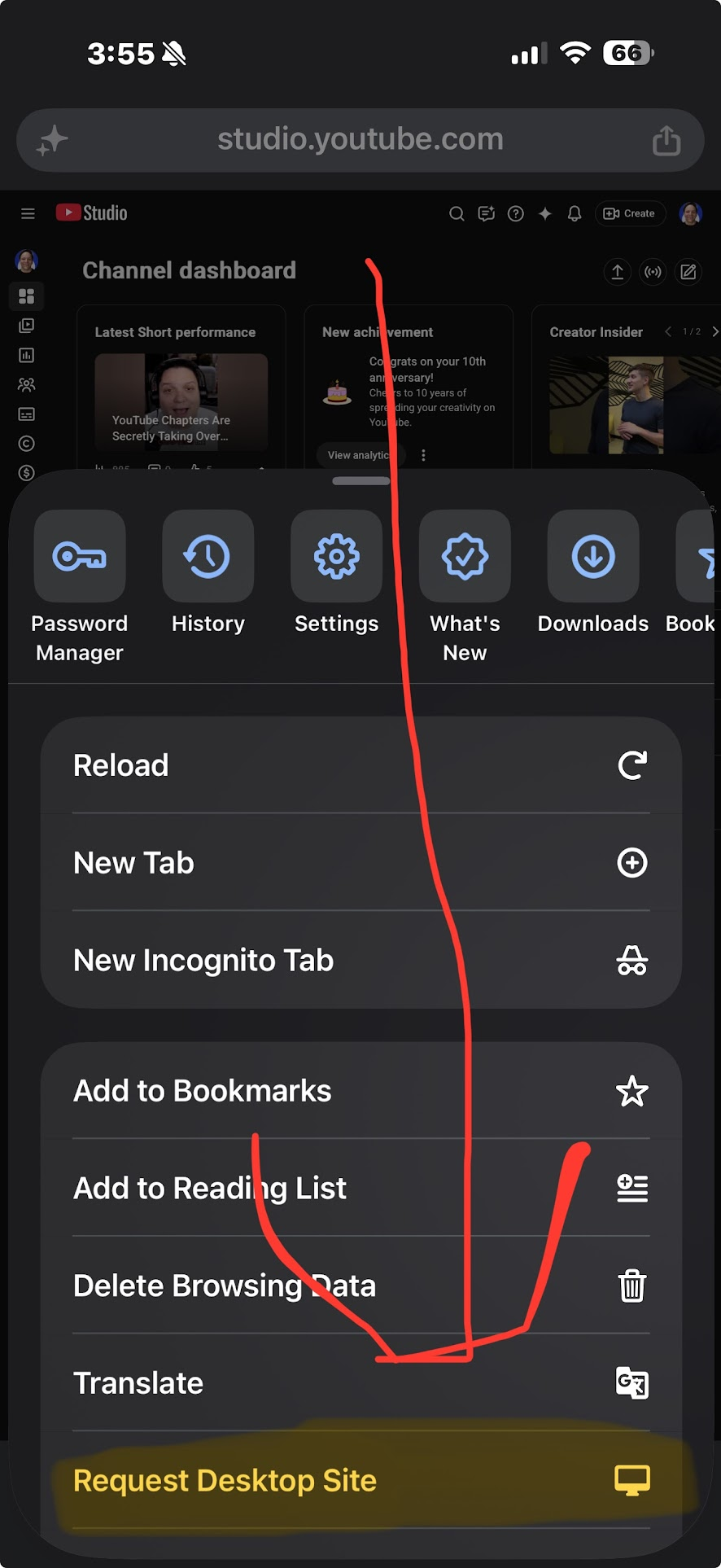
Here are the steps in full. First, open a browser on your phone, such as Chrome or Safari, and go to studio.youtube.com. Second, open the browser menu, the three dots in Chrome or the "aA" icon in Safari, and turn on Request Desktop Site. The page will reload into the full desktop Studio, running on your phone.
It is not as comfortable as a real monitor. The text is small, you will be pinching and zooming, and it is fiddly. I am not going to pretend it is a lovely experience. But it works, and it means the full toolset is always in your pocket. When you are out and you need to actually dig into a video instead of just glance at it, this is how you do it without finding a laptop. Browser menus change, so if you do not see the option right away, look for anything labeled Desktop Site or Desktop View, and verify it on your own device before you assume it is missing.
Think of it like your channel's report card
I have sometimes described YouTube Analytics as your channel's report card, and the mobile app versus desktop split is the difference between two ways of reading that card.
The mobile app is the grade at the top of the page. It tells you an A or a C, and that is useful at a glance. But the part that actually helps you improve is the teacher's comments underneath, the specific notes about where you did well and where you lost the room. Advanced Mode is those comments. If you only ever read the grade, you will know whether something worked, but you will never know why, and "why" is the only thing that helps you make the next video better. A report card with the comments cut off is not really a report card. It is just a letter.
Is the YouTube Studio Mobile enough?
I have to admit something here. I check the YouTube Studio mobile app daily. It is one of the first things I open in the morning, and for years it is easy. The easy tool is not always the right tool, and I know a lot of creators myself included are guilty of the exact habit I am telling you to break.
What changed my routine was getting in the habit of asking a real question instead of just taking the temperature. The moment the question became "why did this video do that" rather than "how many views did it get," the app ran out of answers and I had to go to Advanced Mode. So I am not telling you to delete the app or to feel bad for using it. I am telling you to notice which question you are asking. Glancing YouTube Studios mobile apps job. Investigating is an Advanced Mode job. The mistake is using the glance tool to make the investigate decisions, and I made that mistake for longer than I would like to admit.
Where this fits in your weekly routine
Use the mobile app for the daily check and the quick reply, the way it was designed. Then set aside time, once a week is a good start, to open the desktop YouTube Studio, on a computer or through Request Desktop Site on your phone, and actually sit in Advanced Mode. Pick one video, set a real date range, compare it against another, and read the retention graph against similar content. That one weekly habit will teach you more than a month of glancing at the app ever could.
If you are ready to act on what you find, two of the most useful things to test are your thumbnails and your understanding of what the algorithm now rewards. I walked through YouTube's free thumbnail testing tool in How to A/B Test YouTube Thumbnails, and the bigger shift in what the algorithm measures in How the YouTube Algorithm Works Now.
The working creator's version of all this is one line. The mobile app tells you what happened, and Advanced Mode on desktop tells you why, so stop making strategy calls from the version that cannot answer the question you are really asking.
If you want every term in your analytics broken down in plain English, the free YouTube Glossary and Creator Dictionary is at kdcc.social/pages/youtube-glossary, and the KDCC newsletter sends the weekly plain-English translation of YouTube changes. If you get stuck reading your own numbers, bring the screenshot to the KDCC community at kdcc.social, where a couple thousand creators are working it out together. I love this stuff, so ask.
If I Kan, You Kan Too.
YouTube Studio analytics FAQ
Does the YouTube Studio mobile app have Advanced Mode? No. Advanced Mode is a desktop-only feature inside YouTube Studio. The mobile app gives you a simplified overview with preset date ranges and no Advanced Mode button. To reach Advanced Mode you need the desktop version of Studio, which you can open on a computer or through a mobile browser using Request Desktop Site.
Can you get desktop YouTube Studio on your phone? Yes. Open a mobile browser, go to studio.youtube.com, then turn on Request Desktop Site from the browser menu. The page reloads as the full desktop Studio, including Advanced Mode. It is small and fiddly on a phone screen, but every desktop tool is there.
What can you not do in the YouTube Studio mobile app? You cannot use Advanced Mode, set a custom date range, compare periods or videos side by side, view playlist, card, and end screen data, see certain metrics as a chart rather than a flat percentage, or export reports as a CSV. The app is built for quick checks, not deep analysis.
Is there anything the mobile app does that desktop does not? Yes, one thing. Remix analytics, which show how other creators are turning your video into their own Shorts, currently live in the mobile app and are not on desktop. That is the main reason to keep the app around even after you move your real analysis to desktop.
Where is the Advanced Mode button in YouTube Studio? On the desktop Analytics page, look in the top right corner for the Advanced Mode button. Clicking it opens the full metrics table where you can filter, compare, set custom date ranges, and export. Menu placement can change over time, so confirm it in your own Studio.
How often should you check Advanced Mode? Use the app for a daily glance, and set aside time about once a week to sit in Advanced Mode on desktop. Pick one video, set a real date range, compare it to another, and study the retention graph. A weekly deep read teaches you far more than checking the app every day.
Further reading from YouTube
YouTube Help Center: Advanced Mode in YouTube Analytics : YouTube's own overview of what Advanced Mode does, including filtering, comparing, and exporting reports.