The Stream Deck Mini: Discord Edition Explained: What It Is, Why Creators Use It, and How It Helps.
The Stream Deck Mini: Discord Edition is a six-key controller from Elgato pre-configured for Discord. Here is what it is, why creators use it, and how it helps.

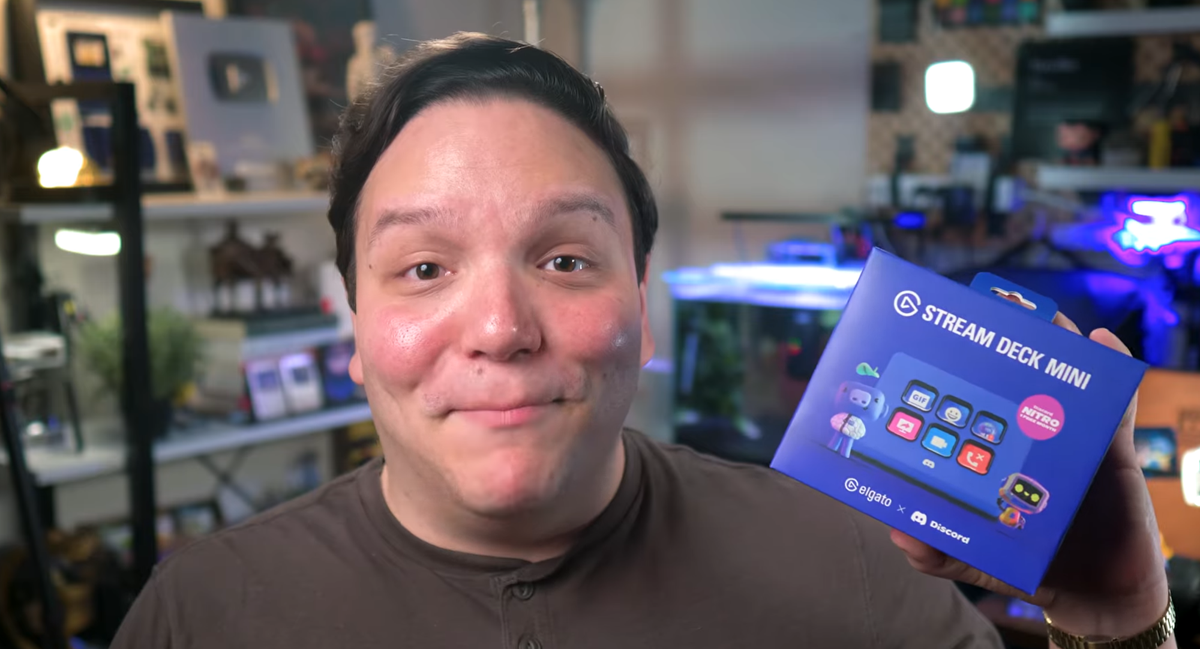
The Stream Deck Mini: Discord Edition is a six-key customizable LCD controller from Elgato, built in partnership with Discord and pre-configured to control Discord right out of the box. The edition arrives in Discord's signature Blurple finish at $59.99, and every purchase includes one month of Discord Nitro at no extra cost. If you already use Discord to build or run a creator community, this little controller removes most of the friction from managing voice, mute, soundboard, and screen share while you are live or filming.
Before I go any further, I want to be upfront. Elgato sent me the Stream Deck Mini: Discord Edition because I am part of their ambassador program, and this post and the companion video include affiliate links to Elgato. Elgato did not pay me to make this content, and they did not see the video or this post before you did. Using the affiliate links helps support the channel at no additional cost to you.
What Is the Stream Deck Mini: Discord Edition?
The Stream Deck Mini: Discord Edition is the compact six-key version of Elgato's Stream Deck line, finished in Discord's Blurple color and pre-configured for Discord out of the box. The hardware itself is the standard Stream Deck Mini, which means a solid build, six customizable LCD buttons, and a USB-C connection. What is different with this edition is the software layer, because the buttons arrive already mapped to the Discord controls creators use most, so you do not have to build a profile from scratch before you get value out of it.
Elgato calls the device "Your Discord Companion" on the product page, and that framing is pretty accurate once you plug it in. The controls that normally live behind keyboard shortcuts or buried menus are sitting on physical keys with live visual feedback on the LCD screens, which is a very different experience than hunting through Discord with your mouse during a stream or a recording.
What Comes in the Box and What Does It Cost?
The Stream Deck Mini: Discord Edition retails at $59.99 and is available at select retailers in more than forty countries, so there is a reasonable chance one is stocked near you or available to ship online. Inside the box you get the Stream Deck Mini itself in Discord Blurple, a USB-C cable, a quick start guide, and a code for one month of Discord Nitro, which is roughly a ten dollar value on its own.
If you want to grab one, here is the Elgato product page and store locator where you can find a retailer in your area, and many of those retailers also offer online ordering. Using that affiliate link supports the channel at no extra cost to you, and it helps fund content like this.
Why Is Discord a Core Part of the Creator Stack?
Discord is one of the most powerful community-building tools a creator can lean on, because it is a dedicated space where your audience can hang out and have real conversations instead of leaving one-off comments and disappearing. The places where short-form and long-form content actually live are not built for relationships. Comments sections do not scale into community, and group chats do not give members a reason to come back. Discord gives creators a persistent home where community members can talk to each other as well as to the creator, and that is what changes the economics of how a channel grows over time.
We built the Kan Do Creators Community Discord around exactly that idea, because creators who already have a channel need a place to get real help and real support from people who have done the work. That is the context for why Elgato and Discord partnered on a dedicated controller in the first place, because Discord has moved from a gamer chat tool into a core part of the creator stack, and the workflows inside it deserve better controls than a pile of keyboard shortcuts.
Why Does a Dedicated Discord Controller Help Creators?
Creators who lean on Discord are constantly toggling mute, jumping voice channels, firing soundboard clips, and starting screen shares, and most of those actions live behind a menu or a keyboard shortcut that is easy to miss mid-conversation. The Stream Deck Mini: Discord Edition collapses all of that into physical buttons with live visual feedback, which is a meaningful upgrade when you are trying to stay present with a community on the other side of the microphone.
The other reason this matters is attention cost. Every time you break flow to hunt for the mute button, or alt-tab to start a screen share, or scroll through channels to find the right voice room, you pay for it with your focus. A dedicated controller takes that cost off the table, and the savings compound over a long stream or a heavy recording day. For creators who are live in Discord regularly, the device pays for itself pretty quickly just in mental overhead removed.
How Does the Stream Deck Mini Help During Streams and Recording?
The Stream Deck Mini: Discord Edition arrives pre-mapped with the Discord functions creators reach for most, and the LCD screens update in real time so you can see your status without guessing. The default layout covers mute with live visual feedback on the button itself, a deafen toggle that controls what you can hear, instant soundboard access, screen share and stream start, and voice channel switching without clicking through menus.
The practical payoff is the end of the "wait, am I muted?" problem, because the button shows you at a glance whether your mic is live. If you have ever tried to hit a soundboard cue mid-stream while clicking through Discord menus, or alt-tabbed to start a screen share while you were already filming, you already understand why this matters. In the companion video I walk through the exact button layout I configured for running the KDCC Discord during livestreams, including what I mapped to each key so I can trigger everything without breaking my flow on camera.
How Can You Use the Stream Deck Mini Beyond Discord?
Yes, and this is where the device stops being a single-purpose controller and starts earning its place on your desk. The Elgato Marketplace has changed how Stream Decks work across the board, because you can download pre-made profiles for different apps, games, streaming setups, and productivity workflows instead of building every action from scratch. There are hundreds of plugins to control the apps and devices you already use, and folders let you turn six physical buttons into as many pages of controls as you need.
For livestreaming, the Stream Deck Mini can switch OBS or Meld Studio scenes, start and stop recordings, adjust audio levels, and fire sound effects. For YouTube productivity, the same six buttons can launch applications, run keyboard macros, control smart lights, and speed up repetitive tasks inside YouTube Studio. Even if you do not buy the Discord Edition specifically, Elgato has built Discord integration into the Stream Deck Marketplace itself, so any existing Stream Deck you already own can access the same Discord controls. Buying the Discord Edition just means you are ready to go right out of the box without configuring anything.
Who Should Consider Adding One to Their Setup?
The creators who get the most out of the Stream Deck Mini: Discord Edition are the ones who already lean on Discord for community, collaboration, or livestreaming. If you run or moderate a creator server, if you jump between voice channels during streams, if you travel with gear and you do not want to reconfigure your main Stream Deck every time you leave the house, or if you want a dedicated compact control surface for Discord without giving up your primary Stream Deck setup, this hits the brief.
The price point at $59.99 also makes it a reasonable starting point for creators who have been curious about Stream Deck hardware but did not want to commit to the full-size versions yet. You still get the core Stream Deck experience, including the Marketplace, the plugin library, and full customization, just in a smaller footprint that does not dominate the desk.
Where Can You See the Full Setup in Action?
The companion video on the Kan Do Creators Community YouTube channel walks through the unboxing, the default Discord button layout, and the custom profile I built for running our KDCC livestreams, including how I set up screen share, voice channel hops, and soundboard cues to trigger without looking. If you are deciding whether the Stream Deck Mini: Discord Edition belongs on your desk, the video gives you the full hands-on look before you decide to pick one up.
If you want to join the conversation with other creators who are building communities on Discord, we run the Kan Do Creators Community for exactly that reason, and the KDCC newsletter keeps you up to date on the creator tools worth watching and the YouTube systems changes worth knowing about.
If I Kan, You Kan Too.