MacBook Neo Review: Is Apple's $699 Laptop Good Enough for Creators?
After years on Windows, Ike Do switched to the MacBook Neo as her writing and editing laptop. Here is what Apple's cheapest Mac gets right for creators, where it falls down, and who should actually buy it.

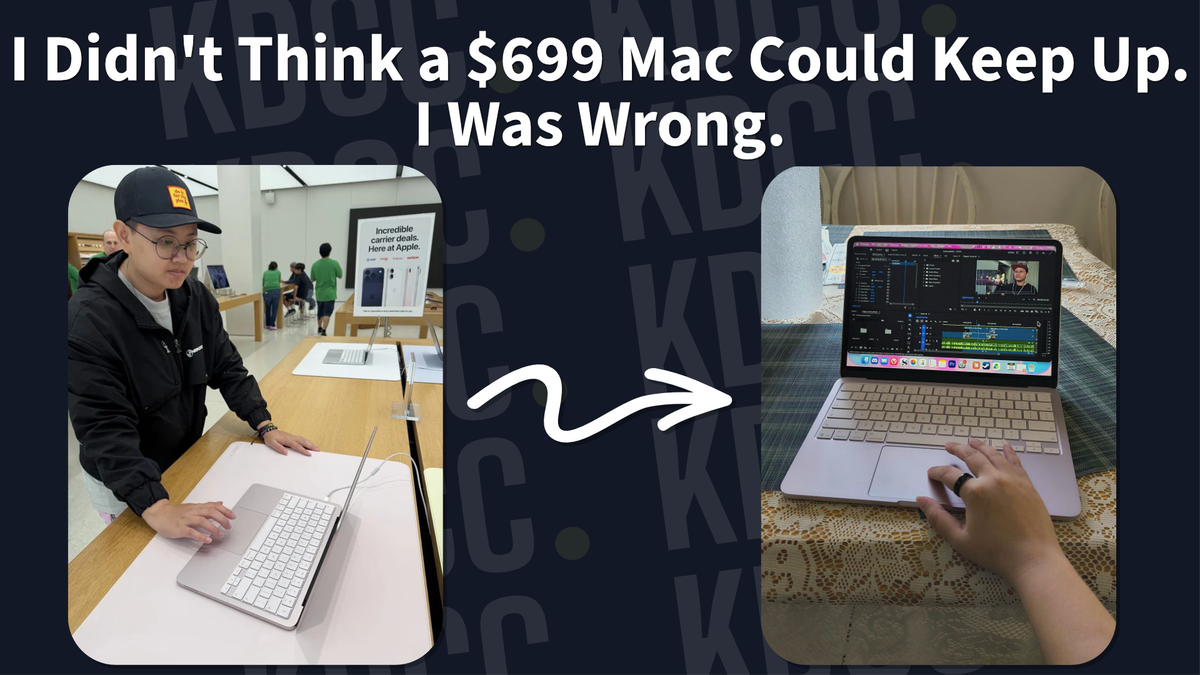
The MacBook Neo is Apple's cheapest laptop, and after years on Windows I switched to it as my main machine for writing and editing on the go.
Short version: it handles 1080p editing in Adobe Premiere, the battery genuinely lasts a full day away from an outlet, and the keyboard is a joy to write on. It is not the machine for 4K work, renders are slow, and 512 GB is the ceiling on storage. Here is my honest POV as a creator who made the switch.
Here is what I cover:
- Why did I stay on Windows for so long?
- Why the MacBook Neo and not the MacBook Pro?
- What is it like switching from Windows to the MacBook Neo?
- Does the MacBook Neo actually hold up for creator work?
- MacBook Neo pros and cons for creators
- Who is the MacBook Neo for?
- MacBook Neo FAQ
Why Did I Stay on Windows for So Long?
I was never interested in getting a Mac because a. I could play most of my games on it and b. it was too expensive. So it was easy to fall into the Windows pipe-line.
Being on Windows meant I could play whatever game I wanted and it was cheap (if you know the right build).
However, Windows is prone to catching more viruses and blue-screening than a Mac. Whenever Microsoft decides to update, it breaks all of my settings whether it's my audio, my OBS settings, etc.
Windows 10 wasn't great, but in hindsight, it was a lot better than Windows 11.
Still, I never broke away from Windows. Until the MacBook Neo came out.
Why the Macbook Neo, not the Macbook Pro?
For $699, the MacBook Neo is the cheapest of all MacBooks, and when compared to other Windows laptop with similar prices, it's beats them all by a long shot.
You can check Apple's site on the specs of the MacBook Neo, but for those who aren't particularly adept at understanding the specs (like me), just know that as a creator, you can edit videos without much issue on this laptop.
Before the MacBook Neo, I used the Asus Zenbook Duo. I loved that laptop simply because of its dual screen capability. There was no need for me to bring an additional monitor with me because it was already in the Zenbook Duo. Unfortunately, it's still relatively new tech and because of that, it has a lot of issues with Windows. The battery life is awful, lasting at best 2 to 3 hours if you're using both screens.
As great as the Zenbook Duo, it's not great to take out for events or anywhere that doesn't have a charging port.
Apple advertises the MacBook Neo as being able to run up to 16 hours of video streaming, a long lasting battery life. Although I'd have to go back to a single monitor, I'll be able to last through an entire day without needing to charge.
Plus, it comes in very bright colors unlike the other MacBooks which are either a variety of silver, grey, and black.

So the honest answer to why the Neo and not the Pro: the Pro is the machine you buy when your work demands it. The Neo is the machine you buy when what you actually need is a laptop that survives an eight hour day at a cafe or an event and still opens Premiere when you get there.
What Is It Like Switching from Windows to the MacBook Neo?
When I first start up the MacBook Neo, I found the setup process to pretty much be the same as Windows. If you're making a full switch to Mac, you'll be able to transfer over from your old machine. You will need to create an Apple account if you're new.
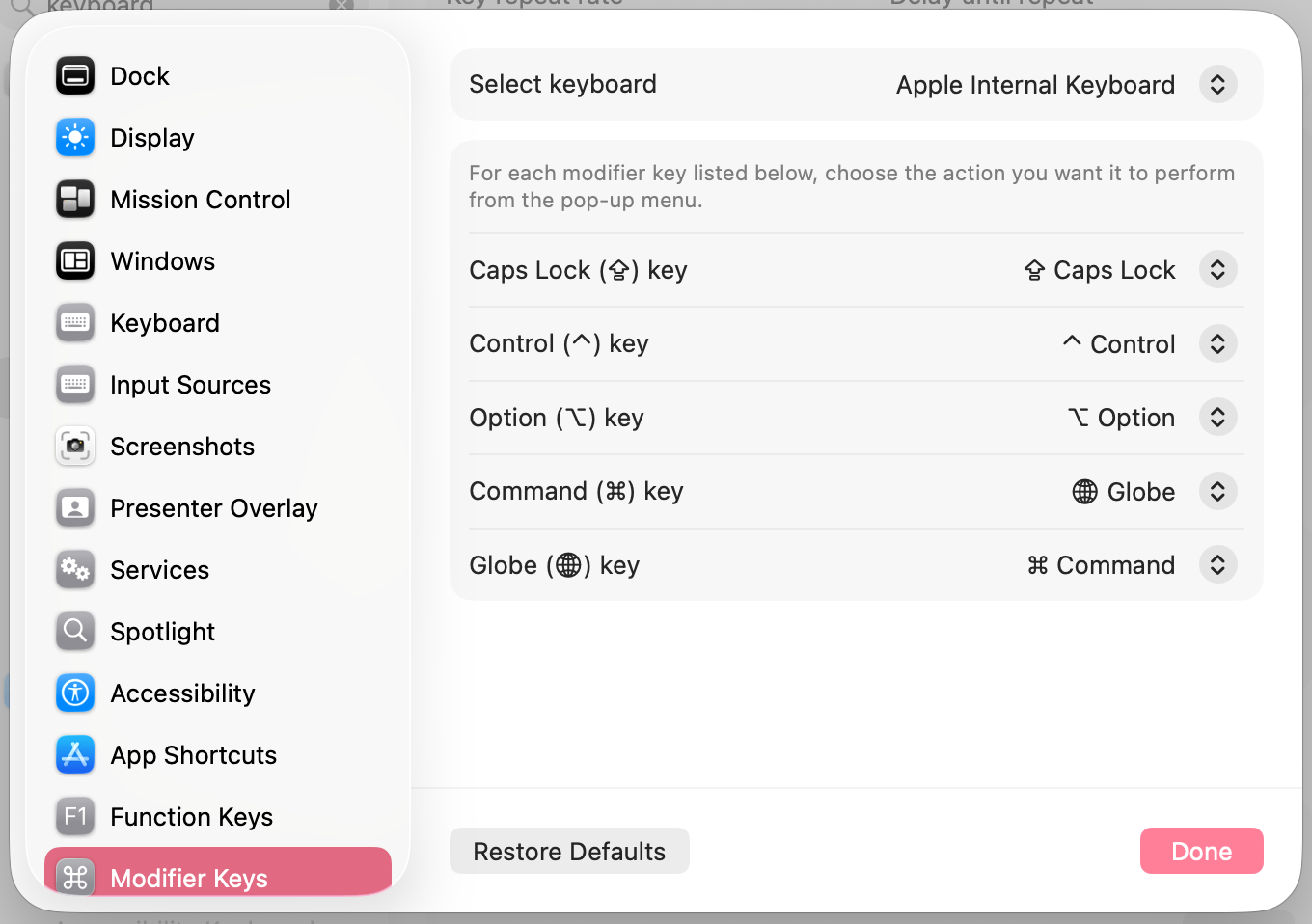
Before I did anything else, I swapped the Globe key (bottom left of the keyboard) to Control. Head to System settings, search "modifier keys," and remap it there. If your muscle memory is built on Windows shortcuts like me, this one change saves you weeks of frustration.
The biggest adjustment for me wasn't the difficulty, but the unfamiliarity (and desire to not change). Once I got the basics down, it becomes a lot easier. A few of the differences that takes some getting used to were the window controls, which sat on the top-left instead of top-right. The fullscreen opens into its own virtual desktop rather than just filling your current window, and Finder does the same job Explorer does.
The keyboard is crisp and feels very nice to type on. It's actually the part I was most excited about, considering I write for a living.
There are only two USB-C ports on this laptop, so you'll need to purchase a dongle if you need to connect anything that doesn't involve bluetooth.
Since the MacBook Neo has an internal SSD, the bootup time is nearly instantaneous. When you restart or shut down and power up the Neo, it'll automatically reopen all the apps you had before (and it'll also open up apps that are set to automatically open when turning on—for example, Steam). This can be both good and bad. Good because you won't have to open the app and you can hop right back to work. Bad because if you have too many apps opened, it will lag.

I was quite surprised on how fast everything loaded at first, from the boot time to reopening apps. However, it does lag if you have several apps opened at the same time.
Adobe Premiere runs well on the MacBook Neo, which surprised me given this is Apple's most affordable Mac. When paired with cloud storage, it opens up a real "edit on the go" workflow.
A small, but amazing feature on the Mac is the Help function. You can access the Help function in every single app. Whenever you feel stuck, not knowing which settings are where, the Help function will point you in the right direction so you'd won't have to go down a support-forum rabbit hole.
Does the MacBook Neo actually hold up for creator work?
As mentioned before, I use the MacBook Neo mainly for editing and writing. It's my go-to laptop when I go out to a cafe and write. I never have to worry about it running out, even when I forget to charge it the day before.
I still record on my PC because that's where the majority of my physical storage lives, and after I finish recording, I place it into my cloud storage which I can then bring onto the MacBook Neo. It's easy to move my edits in between my PC and laptop. The same goes for all of my thumbnails for when I need to make an emergency edit and I'm not on my PC.
It runs well with Adobe Premiere. Combining the Neo with the Elgato Stream Deck makes it an incredibly powerful editing tool on-the-go.
One of the issues I have is the rendering process. No matter what settings I choose or what GPU/CPU I select, it takes a very long time to render. Plus, since I only edit footages in 1080p, I can't say how it would perform if you edit in 4K. However, if I consider the render time for 1080p footages, I would assume the MacBook Neo would have problems with 4K footages.
The max storage for the MacBook Neo is 512 GB, so if you plan on making it your main editor, you will need to have an external storage or cloud storage.
Another issue I've come to noticed is the initial lag when you wake up your laptop. It'll turn on and return you to the screen you were on before it went to sleep in a snap, but it takes a couple of seconds before your clicks actually register. Not a dealbreaker. Just annoying.
MacBook Neo Pros and Cons for Creators
If you want my findings in one place, here they are.
What works
- Adobe Premiere runs well on 1080p projects, which I did not expect at this price.
- Battery lasts a full day of writing and light editing away from an outlet.
- The keyboard is the best part if you write for a living.
- Near instant boot, and it reopens your apps where you left them.
- Pairs well with an Elgato Stream Deck for editing on the go.
- The Help menu in every app saves you from support-forum rabbit holes.
What does not
- Render times are slow no matter which settings you pick.
- 512 GB is the storage ceiling, so cloud or external storage is mandatory as a main editor.
- It lags with several apps open at once.
- A couple of seconds of dead clicks when waking from sleep.
- Two USB-C ports, so budget for a dongle.
- I have not tested 4K, and based on my 1080p render times I would not expect it to keep up.
Who is the MacBook Neo for?
If you've been thinking about getting a MacBook, but have always been put off by the price... then the MacBook Neo might be for you. At the very least, it'll be the stepping stone into the world of Mac.
If you're like me and you love to write, doesn't matter if it's fiction, nonfiction, blogs, script writing, then the MacBook Neo is for you.

I use Adobe Premiere and Affinity for editing videos and thumbnails, both of which works well on the MacBook Neo as long as you're not editing heavy files. So if you mainly edit 1080p and you to keep up with your editing even when you're away from your PC, consider the MacBook Neo.
If you need to edit and render 2K or 4K files, unfortunately the MacBook Neo might not be able to handle it. You'll need the MacBook Pro, which is the most expensive.