YouTube Thumbnail Size Update: The 4K Era Is Here
YouTube officially updated their thumbnail best practices, and the headline change is significant: the new recommended resolution is 3840x2160 pixels and desktop uploads now support 50MB files. Here is everything creators need to know.

YouTube thumbnail best practices are the official guidelines YouTube publishes for creators uploading custom images to their videos, covering recommended resolution, file size limits, accepted formats, and aspect ratio requirements. YouTube has officially updated these guidelines in their help documentation, and the headline change is significant: the new recommended thumbnail resolution is 3840 x 2160 pixels, a full 4K standard that replaces the creator community's long-standing consensus around 1280x720. This update signals something much bigger than a routine spec sheet revision, and every creator designing thumbnails right now needs to understand what changed and why it matters.
What Is the New YouTube Thumbnail Resolution?
For years, 1280x720 was the de facto thumbnail standard across the creator community. That consensus made complete sense when 1080p was the dominant screen resolution and the majority of YouTube viewing happened on desktop monitors and phones. The viewing landscape has shifted dramatically since then, and YouTube's updated documentation finally reflects where the audience actually is.
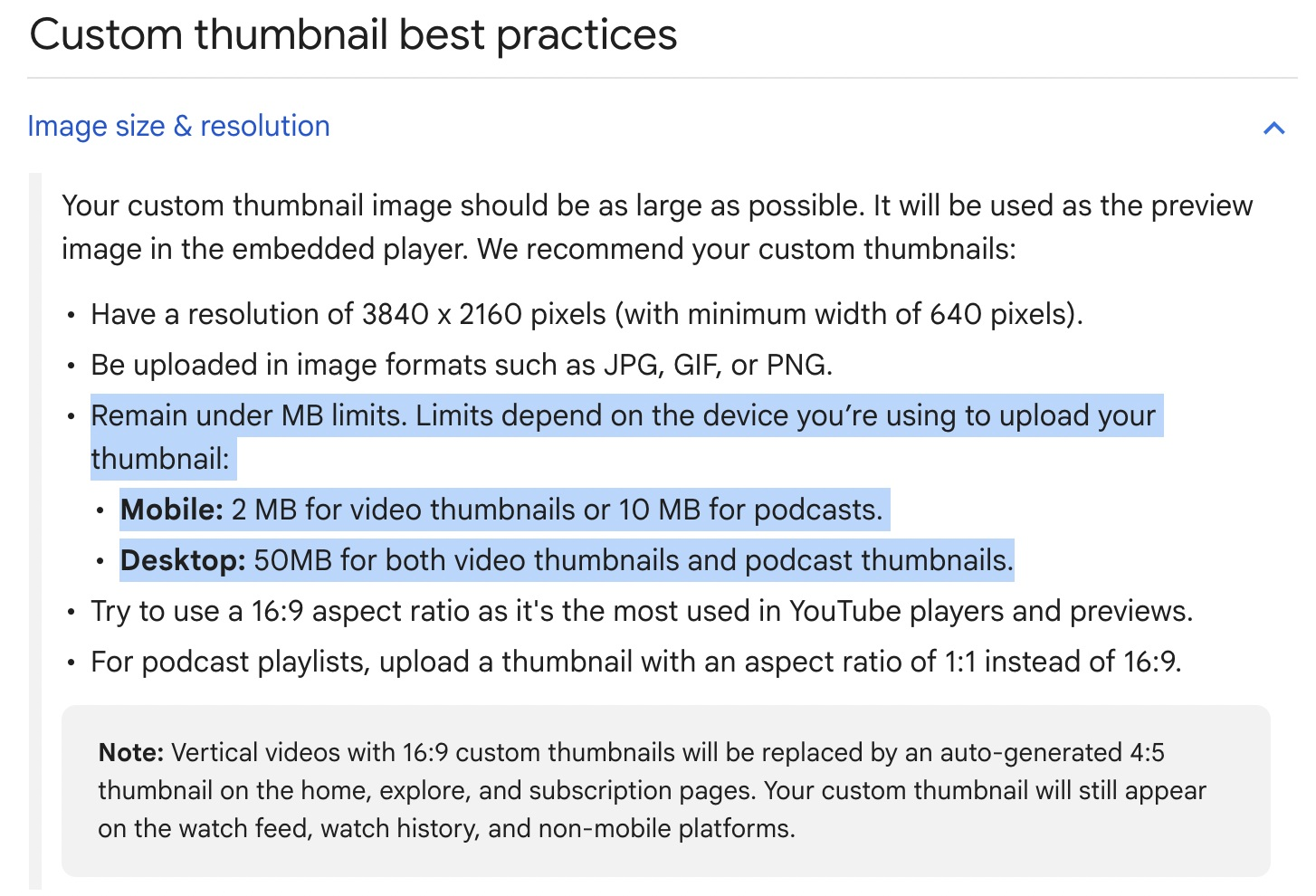
According to YouTube's official thumbnail help page, the new recommended resolution is 3840 x 2160 pixels, with a minimum width of 640 pixels. That is a full 4K resolution, three times the linear dimension of the old standard, and it changes the entire creative conversation around thumbnail design. The accepted file formats remain JPG, GIF, and PNG, so nothing changes there.
This is not a minor tweak. Your thumbnail is the first visual impression a potential viewer gets of your content before they ever click. Designing at 4K means you finally have the room to bring in fine detail, rich layered compositions, sharp text, and complex visual work without the whole thing falling apart when it scales across different screen sizes. The constraint that kept designers playing small has been officially retired.
How Did YouTube Thumbnail File Size Limits Change?
This is the part of the update that most creators will scroll right past, and it deserves its own section because the practical impact here is enormous.
The new file size limits are not a single number. They depend entirely on which device you use to upload your thumbnail, and the gap between the two options is significant.
| Upload Device | Video Thumbnails | Podcast Thumbnails |
|---|---|---|
| Mobile | 2 MB | 10 MB |
| Desktop | 50 MB | 50 MB |
Take a moment and genuinely sit with that desktop number, because 50 MB is not a typo. The previous thumbnail upload limit was 2 MB regardless of device, which meant designers had been spending years compressing the life out of their work just to clear an arbitrary ceiling. Complex gradients got flattened. Texture-heavy designs got muddied. Layered compositions that looked great in Photoshop or Canva arrived on YouTube looking like a different image entirely.
That ceiling is now effectively gone for desktop uploads. Bring the gradients. Bring the textures. Bring the layered compositions and the high-resolution detail you have been holding back. The creative standard for what a YouTube thumbnail can look like just took a meaningful leap forward.
Why Does It Matter Where You Upload Your Thumbnail?
Here is the immediate, practical implication of that file size table: if you have been uploading thumbnails from your phone because it is faster or more convenient, you are operating under the 2 - 10MB limit while desktop gives you up to 50 MB of headroom. Same channel, same video, same thumbnail file sitting on your hard drive, but a completely different quality ceiling based solely on the device in your hands at upload time.
Uploading from YouTube Studio on desktop is no longer just a workflow preference; it is the difference between a compressed image and a full-resolution, studio-quality thumbnail that holds up on every screen size YouTube serves. The extra two minutes it takes to switch devices is worth it every single time, and it should become a non-negotiable part of your publishing checklist from here forward.
What Are the Aspect Ratio Rules for YouTube Thumbnails?
The standard 16:9 aspect ratio remains the recommendation for video thumbnails, and that has not changed. There are a few additional rules, though, that are worth understanding fully rather than learning the hard way after publishing.
For podcast playlists specifically, YouTube recommends a 1:1 square aspect ratio rather than 16:9. If you run a podcast on YouTube and have been uploading rectangular images for your playlist artwork, this is the moment to audit those assets and bring them into compliance.
The vertical video rule is also worth understanding clearly. If you upload a vertical video with a 16:9 custom thumbnail, YouTube will automatically crop it to a 4:5 ratio when displaying it on the home page, explore page, and subscription feed. Your original 16:9 custom thumbnail still appears in the watch feed, watch history, and on non-mobile platforms, so it is not lost entirely. The cropped version, however, is what the majority of mobile viewers will encounter first as they scroll their feed, which is worth factoring into how you compose vertical video thumbnails from the start.
Why Did YouTube Raise the Bar on Thumbnails Now?
This update did not come out of nowhere, and understanding the context makes the whole thing land differently.
YouTube is the number one streaming service on televisions in the United States, with more total watch time than any other streaming platform. Creators are now competing for attention on 65-inch and 75-inch living room screens, sitting alongside HBO dramas and Netflix originals in the same interface on someone's home theater setup. A thumbnail designed at 1280x720 and compressed to meet a 2 MB file limit does not hold up at that display size. It looks soft. It looks small in a way that reads as amateur next to streaming content that has dedicated design teams working at full resolution.
YouTube raising the resolution standard and the file size ceiling is them stating clearly, in official documentation, that they are a television platform now. The implicit message to creators is equally clear: your work should reflect that ambition, too.
What Should Creators Actually Do With This Information?
You do not need to panic-rebuild every thumbnail in your back catalog today, but you absolutely should update your templates and your workflow going forward.
Start by opening your design tool of choice and creating a new base template at 3840x2160. The 16:9 ratio stays the same, so your existing compositions will scale up cleanly without restructuring. Export your thumbnails at full resolution without aggressive compression settings, since the desktop upload limit now makes that compression unnecessary. From that point forward, make desktop the default for all thumbnail uploads inside YouTube Studio.
If you manage a podcast playlist on YouTube, check your playlist thumbnail dimensions and update any 16:9 assets to 1:1. If you regularly publish vertical video content, start composing your 16:9 custom thumbnails with the 4:5 mobile crop in mind so the most important visual information survives the automatic adjustment on home and explore.
These are small, fast workflow changes. The cumulative impact on how your content presents itself across every surface YouTube displays it is anything but small.
Quick Reference: YouTube Thumbnail Specs to Bookmark
| Spec | Details |
|---|---|
| Recommended resolution | 3840 x 2160 pixels |
| Minimum width | 640 pixels |
| Accepted formats | JPG, GIF, PNG |
| Desktop file limit | 50 MB (video and podcast) |
| Mobile file limit | 2 MB (video) / 10 MB (podcast) |
| Video aspect ratio | 16:9 |
| Podcast playlist aspect ratio | 1:1 |
| Vertical video note | 16:9 custom thumbnails are auto-cropped to 4:5 on home, explore, and subscription feeds; your original still displays in watch history and on desktop |
Source: YouTube Help — Add Video Thumbnails on YouTube
The creative ceiling for YouTube thumbnails just got blown wide open. Designers who have been making compromises because of compression limits can now bring the full weight of their craft to every thumbnail. Creators who have been uploading from mobile out of habit now have a concrete, numbers-backed reason to change that workflow.
Are you updating your thumbnail templates after this? Drop a comment below and let me know what you are rebuilding first. If you want to go deeper on thumbnail strategy, what actually drives click-through rate, and how to design with intent rather than instinct, come hang out with us inside the KDCC community at kdcc.social. We talk about this stuff every day.
If I Kan, You Kan Too.
This post contains affiliate links. KDCC may earn a commission at no additional cost to you if you make a purchase through one of our links.