YouTube Slashed Its Shopping Affiliate Subscriber Requirement Four Times. Here Is What That Actually Means for Creators.
YouTube lowered its Shopping Affiliate subscriber floor to 500 for the fourth time. Here is the full threshold history, who qualifies now, and why this pattern matters more than any single eligibility update.

The YouTube Shopping Affiliate Program is a native monetization feature that lets eligible YouTube Partner Program creators tag products directly in their videos, Shorts, and livestreams, then earn commissions when viewers purchase those products on a retailer's site. On March 27, 2026, YouTube expanded that access to creators in the expanded YPP tier, meaning channels with as few as 500 subscribers now qualify to tag products and earn affiliate commissions inside YouTube Studio. This is the fourth time YouTube has lowered the subscriber floor for this program, and the pattern tells a much bigger story than a single eligibility update.
Before I go any further, I want to be upfront there are a lot of other affiliate programs you could and SHOULD join if you're not at this new lower barrier. Don't wait to reach these levels to monetize. You can do so with affiliate programs at anytime!
Check out our free YouTube affiliate program directory:

How Did the YouTube Shopping Affiliate Subscriber Requirement Change Over Time?
The program launched in 2022 as a limited, invite-only program with a high subscriber floor. Over roughly three years, YouTube steadily lowered the entry point four times:
10,000 subscribers during the early rollout, when the program was limited to a small pool of established creators in select markets.
5,000 subscribers, the first meaningful reduction, which opened the program to a wider range of mid-tier creators still building toward the standard YPP threshold.
1,000 subscribers, a reduction that arrived in early 2026 and aligned affiliate access more closely with the standard YPP tier.
500 subscribers, announced March 27, 2026, tying affiliate eligibility directly to the expanded YPP tier and opening the program to creators at the earliest stage of the monetization journey.
Each reduction has moved in the same direction, and that consistency is not accidental. Ike and I have talked about this on the channel before: YouTube does not lower thresholds for altruistic reasons alone. When the platform makes affiliate commerce easier to access at smaller audience sizes, it is expanding the pool of content that drives product discovery, which increases the value YouTube delivers to its retail partners. The creator wins through commissions, YouTube wins through commerce volume, and the brand wins through scalable product placement. That is a durable loop, and YouTube is clearly investing in it.
Who Qualifies for the YouTube Shopping Affiliate Program After This Update?
To be invited into the program, your channel must meet all of the following requirements:
- Your channel must be enrolled in the YouTube Partner Program, including the expanded YPP tier that allows entry with 500 subscribers.
- Your channel must meet the subscriber threshold for your YPP tier, which is a minimum of 500 subscribers under the expanded tier.
- You must be located in one of the eligible countries: the United States, South Korea, Indonesia, Thailand, Vietnam, Malaysia, the Philippines, India, Singapore, Brazil, Taiwan, or Japan.
- Your channel must not be a music channel, an Official Artist Channel, or associated with music partners such as labels, distributors, publishers, or Vevo.
- Your channel audience must not be set as Made for Kids, and your channel must not have a significant number of individual videos designated as Made for Kids.
If your channel is managed by a content owner, that content owner must accept the affiliate program agreement on your behalf. If you meet all criteria but do not see the affiliate program option in YouTube Studio, confirm you are signed into the correct channel if not then consider contacting YouTube Creator Support.
How Do You Join the YouTube Shopping Affiliate Program?
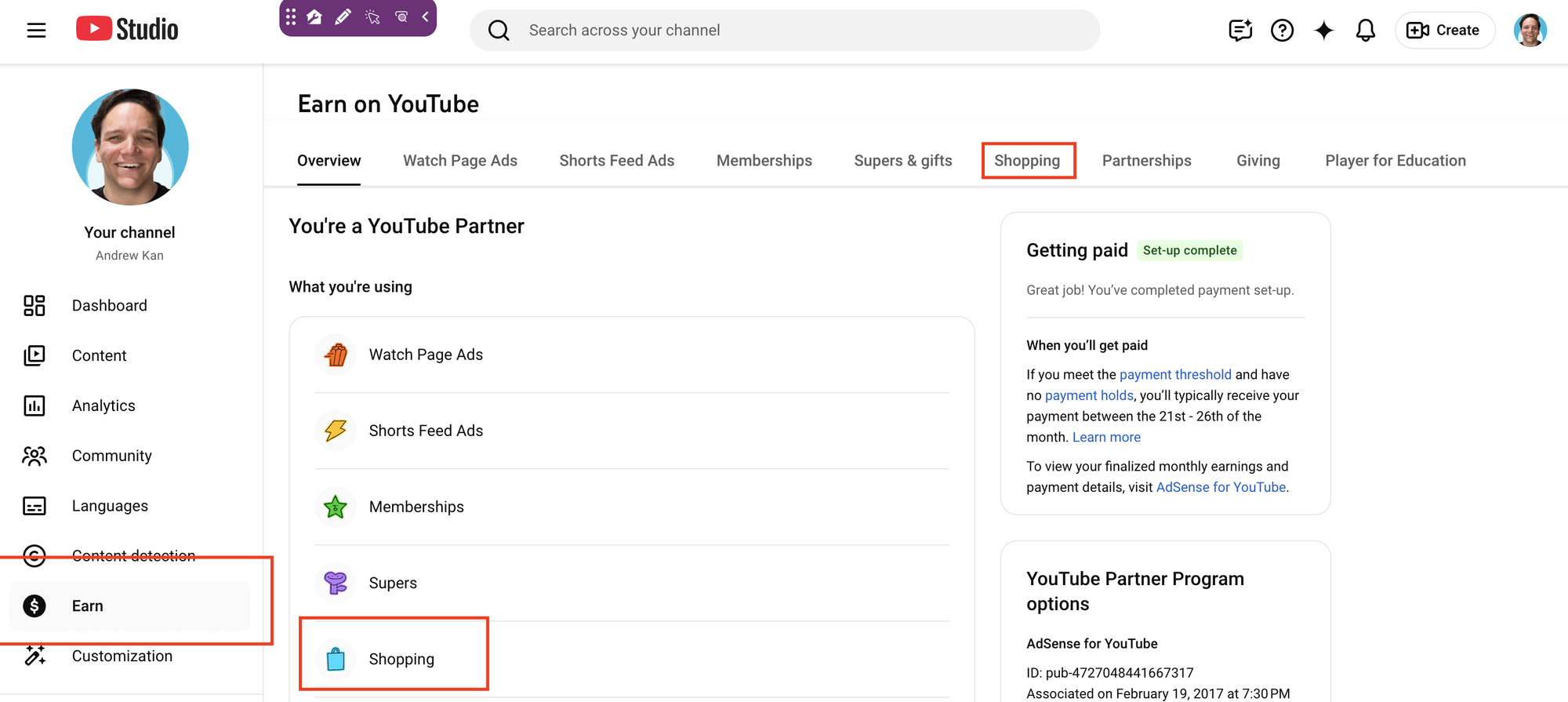
Joining happens entirely through the Earn tab in YouTube Studio. Once you are inside the Earn section, navigate to the Shopping tab, look for the affiliate program prompt, and select Get Started. From there, you review and accept the program's Terms of Service, which places you inside the program immediately. The full step-by-step walkthrough, including exactly what to look for in YouTube Studio if the option is not appearing, is covered in the video above.
What Does the Earning Structure Look Like?
Each participating brand and retailer sets its own commission percentage and attribution window, both of which are visible inside the Affiliate Hub in YouTube Studio before you commit to tagging anything. When a viewer clicks a tagged product and completes a purchase on the retailer's site, you earn the commission tied to that product and that retailer's rate.
Commissions are paid through AdSense for YouTube within 60 to 120 days of the purchase, with the window built in to account for customer returns. If a product is returned, the corresponding commission is reversed. US-based creators may also qualify for a monthly performance bonus on top of standard commissions, structured in tiers based on total sales driven during the bonus period. Those tiers and the current bonus window are visible inside YouTube Studio.
One data point worth knowing before you start tagging: according to YouTube's own internal testing, videos with product tags that include timestamp tagging alongside description links generate 43% more product clicks than videos using description links alone. That is a meaningful difference, and it is the kind of detail that should shape how you structure your tagged content from day one.
Why Did YouTube Drop the Shopping Affiliate Requirement to 500 Subscribers?
The real answer is that this benefits YouTube as much as it benefits creators. The 500 subscriber threshold aligns affiliate access with the earliest tier of YouTube monetization and YouTube Partner Program entry, which means every creator who clears that initial monetization milestone now has access to another way to make money on top of their fan-funding features. A creator at 500 subscribers who is already producing content around products they use, gear they recommend, or a niche lifestyle they document now has an on YouTube platform affiliate infrastructure available to them, without needing to build out a separate affiliate links and or system through a third party platform.
This doesn't mean they should only do it on YouTube, it still at the time of this blog isn't supporting digital products, but hopefully that changes to!
For creators who have been sitting in that 500 to 1,000 subscriber range, this is a real move forward. The KDCC has always pushed the idea that you do not need a massive audience to build a real business on YouTube. Ike and I have both said this for years. YouTube is now making moves agreeing with that ideal, and they are backing it up with access rather than just encouragement.
It is also worth noting the competitive context. This announcement came one day after Meta added shopping links to Reels, allowing creators on Facebook and Instagram to link to up to 30 products in a single video. YouTube lowering its affiliate barrier at this specific moment is not coincidental. Platform competition is actively benefiting creators right now, and that is worth paying attention to as you think about where you put your videos and build your following.
How Do You Tag Products in Your Videos After Joining the Program?
Once you are enrolled, you can tag products in new uploads during the upload process, or you can go back and tag your existing library. YouTube Studio includes a bulk tagging feature that scans existing video descriptions for products and surfaces suggestions you can approve with a few clicks. That means a creator who already has 50 videos on a relevant niche does not have to start from scratch; they can go back through their library and activate affiliate tags retroactively.
The full breakdown of how to tag effectively, what call-to-action language drives the most viewer action, and how to use the Affiliate Hub to compare commission rates before you start tagging is covered in the video. Watch that now if you are ready to move into the tactical side of this.
What Is the YouTube Shopping Affiliate Hub?
The Affiliate Hub is the section inside YouTube Studio, accessible through Earn then Shopping then Affiliate Sellers and Offers, where you can browse the full list of participating brands, view their commission percentages, request product samples, and find promotional offers. You can sort sellers alphabetically or by highest commission rate, which makes it easy to prioritize which brands to build content around when you are just getting started.
This is where having a clear content niche pays off directly. A creator with a focused audience in home goods, fitness, beauty, or tech can go into the Affiliate Hub, sort by highest commission in their category, and build their next several videos around the brands offering the strongest rates. That alignment between content strategy and affiliate strategy is something Ike and I break down in the full video.
Get Into the KDCC Community
If you have questions about how to make the most of the YouTube Shopping Affiliate Program, the KDCC Discord is the right place to bring them. We have over 2,500 creators talking through exactly these kinds of monetization decisions, and both Ike and I are active in there.
If We Kan Do It, You Kan Too!