Your YouTube Channel Page Is Costing You Views (Here's What to Fix)
185,000 people visited my YouTube channel page in one year. Most creators completely ignore theirs. Here's what your channel banner, description, keywords, and home tab should actually be doing for you.

Most YouTube creators spend hours on thumbnails, titles, and tags, but completely ignore the one place that every curious viewer eventually lands: your YouTube channel page.
Here's the thing. In the livestream I did breaking all of this down step by step, I pulled up my own analytics and found that 185,000 people visited my YouTube channel page in a single year. That's an entire football stadium worth of potential subscribers, just browsing, trying to decide if they should stick around.
And my click-through rate from that page? About 1.2%. That means there's a massive opportunity sitting right there, waiting for anyone willing to put in the work to optimize it.
So let me walk you through what actually matters on your YouTube channel page, why most creators are getting it wrong, and what you can start fixing today.
Your Channel Banner Needs to Answer 4 Questions
Your YouTube channel banner isn't decoration. It's doing a job, and that job has gotten more complicated now that YouTube is the number one streaming platform on TVs, beating every other streaming service out there.
That means your banner has to work across phones, desktops, and TVs, and if you've ever tried to design for all three, you know the "viewable on all devices" safe zone is tiny.
So what should your banner actually communicate? It needs to quickly and clearly answer:
Who are you? What do you do? How will you help me? Why should I care?
Think about it from your viewer's perspective first. Not what looks cool to you, but what immediately tells a stranger why they should subscribe. If your banner doesn't answer those questions at a glance, you're losing people before they ever click a video.
In the stream, I walk through exactly how to check your banner across all device previews using YouTube Studio's updated tools, including a sizing resource from Chantal Hills that I recommend to almost everyone I work with.
Your Channel Description Is Not a Bio. It's an SEO Engine.
This is the mistake I see more than almost any other. Creators treat their YouTube channel description like a casual introduction: "Hey what's up, I'm here to make cool videos and have fun!"
There's nothing wrong with personality, but a description like that is actively hurting your channel. Here's why.
YouTube, Google, and yes, AI platforms like ChatGPT all use your channel description to understand who you are, what you cover, and when to surface your content in search results. Your description is working for you 24/7 whether you realize it or not.
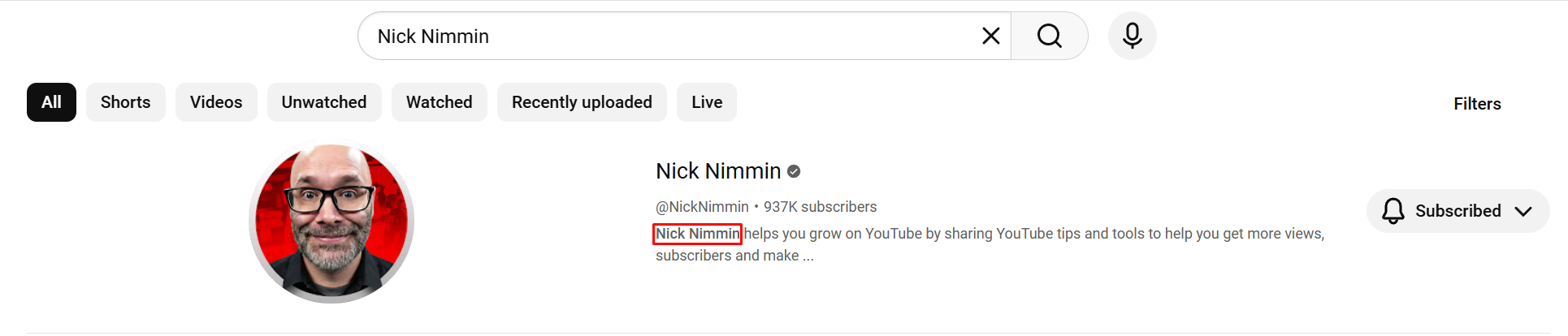
The key insight? Your channel name should appear within the first 20 characters of your description. When someone searches your name on YouTube, that description text gets pulled into the search result, and your name will appear bolded if it matches the query.
I showed a live example of this in the stream using Nick Nimmin's channel as a reference. His description isn't written casually. It's built with intention, and it's one of the reasons he's so easy to find.
Your description should say who you are, what you're here to do for your audience, and make it personal. Mine reads: "Hi, I'm Andrew Kan. This channel is for YouTube creator growth and video production tips, with a simple belief that if I Kan, you Kan too!"
That single paragraph is doing SEO work, building trust with new viewers, AND reflecting my personality. Your description should be doing the same.
Channel Keywords Still Matter (But They're Not Tags)
YouTube has moved away from calling them "tags." They're channel keywords now, and the distinction matters.
Channel keywords are specific terms you want your YouTube channel to show up for when people intentionally search. They live in your YouTube Studio settings (under Settings > Channel > Channel Keywords), and you get 500 characters to work with. That's 500 characters of discoverability if you use them right.
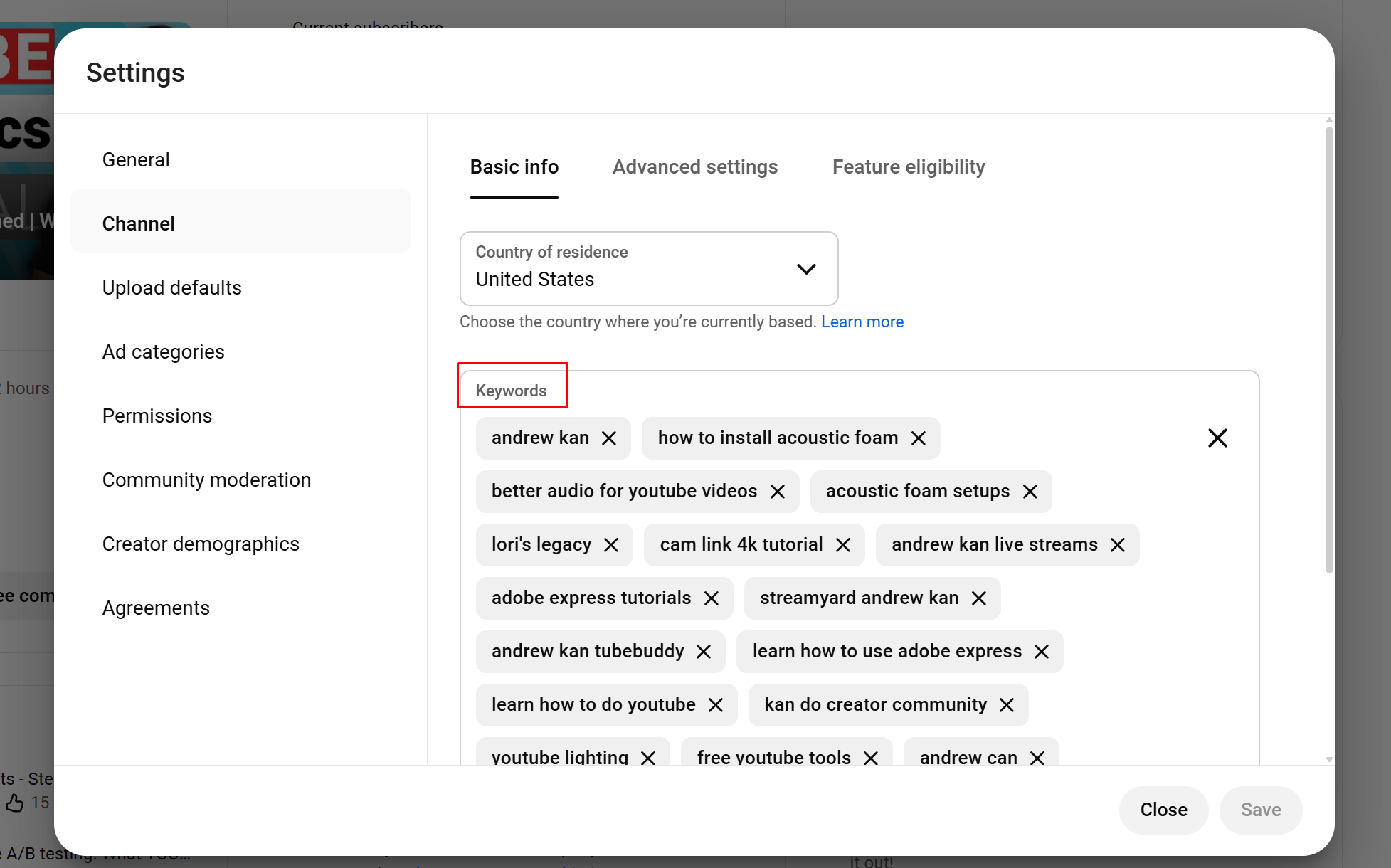
Here's the next-level tip most people miss: your channel keywords should also appear organically in your channel description. When your keywords and description reinforce each other, you're giving YouTube, Google, and AI platforms consistent signals about what your channel is actually about. It's not one or the other. It's both, working together.
A few things to consider when choosing your channel keywords:
Start with your channel name. Especially if there are other creators or people with a similar name. You want to make sure you show up for your own name.
Include misspellings. No matter how many times you tell people, some will spell your name wrong. Having that common misspelling as a keyword means they still find you.
Look at your analytics. Go to your traffic sources and see what terms people are actually searching to find your content. Those commonly searched terms should absolutely be in your channel keywords.
Keep them relevant to what you're making now. If you've moved on from a topic, those old keywords might be doing more harm than good.
I went through my own channel keywords live on stream, removing outdated ones and adding new ones based on what I'm actually focused on today. It was a real-time audit and it's a great exercise to do on your own channel.
Your Home Tab Is Your Storefront. Treat It Like One.
If your YouTube channel home tab is empty or just showing a default grid of uploads, you're leaving so much on the table.
Think of your channel page as your home. When someone walks through the front door, the experience should make sense. If the first room they see is the bathroom, that's confusing. Your home tab should be warm, inviting, and immediately helpful to a new visitor.
YouTube gives you up to 12 sections to customize here. That's 12 opportunities to guide a viewer's experience. And here's where most creators go wrong: they either don't set it up at all, or they fill it with YouTube's default sections instead of intentional, custom playlists.
Channel Trailer: Use Data, Not Gut Feeling
Your channel trailer for new visitors should be the video that converts the most subscribers or gets people watching more of your content. Not just your latest upload. Not just the one you think is cool.
In the stream, I used YouTube's Ask Studio feature to find which of my videos earns the most subscribers AND which ones lead to viewers watching more content. Turns out, one video showed up in both categories. That's the one that belongs in the trailer spot.
If you don't have Ask Studio yet, you can find this same information in your YouTube Analytics. The data is there.
Custom Playlists Over Default Sections. Every Time.
This is something I feel strongly about. YouTube gives you default sections like "Popular Uploads" and "Past Live Streams," but custom single playlists are far more valuable.
Here's why: a default section just says "Past Live Streams." That tells a viewer nothing about what they'll learn or why they should care. A custom playlist titled "Andrew Kan Live Streams: Filmmaking, YouTube Strategy, and Creator Growth" is optimized with keywords, tells the viewer exactly what to expect, and gives YouTube more information to work with when recommending your content.
Same videos. Completely different experience for the viewer. And a much better signal for YouTube's recommendation system.
I did a side-by-side comparison of both approaches live on stream so you can see the difference for yourself.
The Stuff That Seems Small Actually Isn't
There are a handful of smaller details on your channel page that most people skip entirely, but each one contributes to how YouTube and viewers understand your channel.
Your link titles matter. YouTube and Google have confirmed they look at link title text to better understand your URLs. Instead of "My Website," try "Andrew Kan's Website" or "Resources for Creators." I've seen AI search results pull from these titles to surface my channel.
Remove what's not serving you. If you have a social media link to a platform you're not active on, take it down. If you have content on your channel that doesn't fit what you make now and it's what new viewers keep landing on, that's worth evaluating. I removed travel content from my channel that no longer fit. Moved it to a second channel where it actually performs better.
Your channel watermark is free real estate. It appears on every video. Make it your logo. Set it for the entire video. YouTube has talked about possibly removing this feature, but while it's still there, use it.
Translations expand your reach. If you speak multiple languages, YouTube lets you add translated descriptions. It's a way to show up for audiences in other languages, and not enough creators take advantage of it.
The Real Takeaway
Your YouTube channel page is the one place on the platform that's entirely yours. It's not algorithm-driven. It's not randomized. You get to control every section, every word, every playlist, every link.
The creators who treat their channel page with intention, who think about the viewer experience first while still making it personal, are the ones who turn casual browsers into subscribers.
Everything I covered here, I walked through in real time on my own channel during a livestream. I pulled up my analytics, made live changes, showed side-by-side comparisons, and answered audience questions along the way. If you want to follow along and do this on your own channel, the full walkthrough is right here:
👉 Watch: How to Set Up Your YouTube Channel Page and Layout
And if you're looking for a community of creators who are all working on this kind of stuff together, come check out the Kan Do Creators Community. We'd love to have you.
If I Kan, you Kan too!
Andrew Kan