I Asked YouTube's Ask Studio About My Channel and Here's What Happened
Ask Studio is YouTube's free AI analytics assistant built into YouTube Studio. Here is an honest review of what it can do, where it gets things wrong, and the best questions to ask it on your channel.

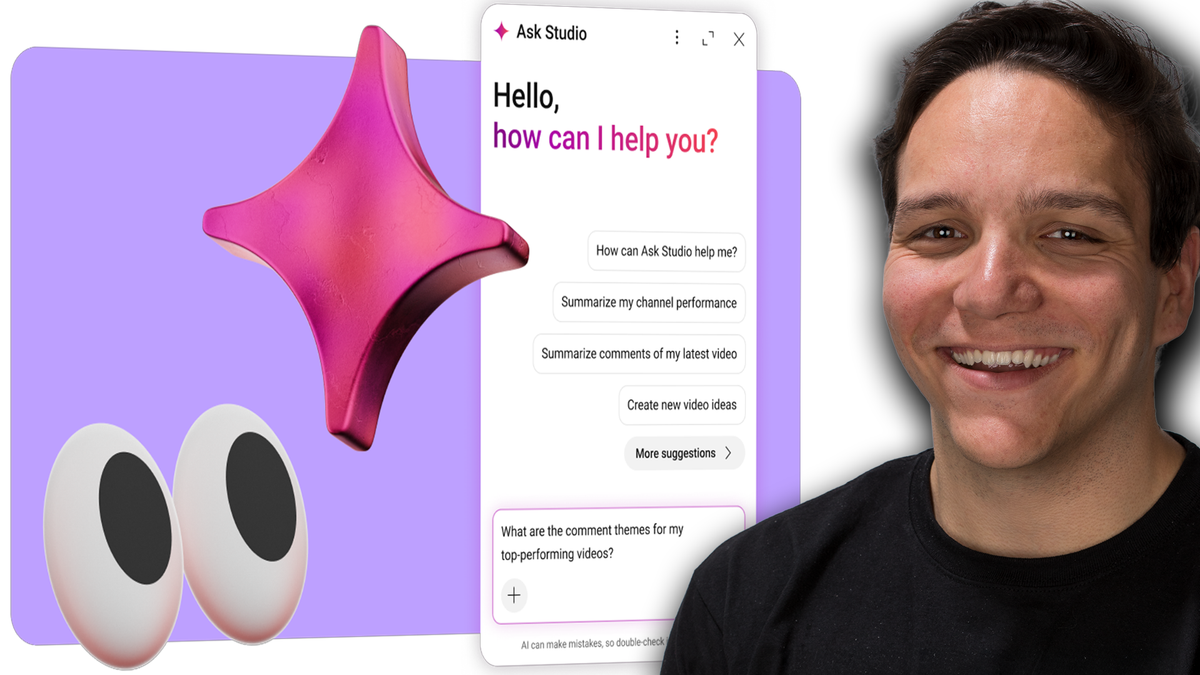
Ask Studio is YouTube's free AI powered YouTube analytics assistant built directly into YouTube Studio that helps creators, understand video performance metrics, summarize comments, brainstorm content ideas, and get personalized channel insights through a conversational chat interface.
Powered by Google's large language models [Gemini], Ask Studio analyzes your YouTube channel data across three core pillars (performance, audience, and content) to deliver actionable recommendations without requiring you to dig through dashboards or scroll through hundreds of viewer comments manually.
I went live and spent over an hour putting Ask Studio through its paces in real time, asking it everything from "what is my audience talking about in the comments" to "can you identify my best and worst thumbnails and explain why." Some of the answers were genuinely impressive. Others missed the mark in ways that every creator should understand before relying on this tool. Here is what I found, what worked, what fell short, and how you can get the most out of Ask Studio on your own channel.
Watch the full Ask Studio livestream breakdown here to see every prompt, every response, and my unfiltered reactions in real time.
What Is Ask Studio on YouTube?
Ask Studio is an experimental AI feature inside YouTube Studio designed to act as a conversational analytics partner for creators. Instead of navigating through multiple tabs and dashboards to understand your channel's performance, you can type a question in plain language and get a response tailored to your specific channel data.
YouTube announced Ask Studio at the Made on YouTube event, and it has since expanded access to creators across the United States, Canada, New Zealand, India, the United Kingdom, the European Economic Area, and Latin America. The tool is currently available only on desktop through a web browser, not through the YouTube Studio mobile app.
To find it, look for the sparkle icon in the top right corner of YouTube Studio. If you see it, you have access. If you do not see it, the feature has not rolled out to your account yet.
One thing YouTube makes clear from the start is that Ask Studio is still an experiment. Right at the top of the chat window, it states that AI can make mistakes. That warning is important, and I saw firsthand during my livestream exactly why it matters.
What Can Ask Studio Actually Do for Your Channel?
When you first open Ask Studio, it introduces itself and offers a quick snapshot of your channel's recent performance. In my case, it pulled data from the last 28 days and told me my subscriber net change was up 133.3%, my estimated revenue had increased 78%, and that while total views were down, the subscriber and revenue growth signaled positive audience momentum.
That kind of summary is genuinely helpful. Instead of jumping between the analytics overview, the revenue tab, and the subscriber count, Ask Studio condensed the highlights into one conversational response.
According to YouTube, Ask Studio focuses on three primary areas of your channel: performance and revenue metrics, audience insights including comment analysis, and content strategy recommendations. During my testing, I found that it handles these three areas with varying degrees of accuracy and usefulness.
The performance analysis side is where Ask Studio shines brightest. When I asked it to compare content that holds my audience versus content that drives high traffic with shorter engagement, it built out a graph and broke down my long-form videos from the last 90 days. It correctly identified that my gear review and creator business content earned longer average view durations, while shorter tutorial videos attracted high views with quicker drop-off. That distinction between audience builders and traffic drivers is a genuinely valuable framework for any creator looking to balance growth with depth.
What Questions Should You Ask Ask Studio?
The quality of the response depends almost entirely on the quality of your question. YouTube's own best practice recommendation is to be specific with your prompts rather than asking broad questions like "tell me about my channel." During the livestream, I tested a wide range of prompts, and the ones that delivered the most useful answers were the ones rooted in a specific strategic goal.
Here are five Ask Studio questions I recommended during the livestream that you can copy and use on your own channel today.
"What is my best and worst performing video, what do they have in common, and what could I improve?" This forces Ask Studio to look at both ends of your content spectrum and identify patterns you might not see when you are too close to your own analytics.
"What could I do over the next month to better my YouTube channel content-wise?" Instead of asking for a vague overview, this prompt anchors Ask Studio to a specific timeframe and pushes it toward actionable recommendations rather than general observations.
"Should I break up my content strategy into YouTube Shorts, long form, or normal YouTube videos?" This is a great one for creators who are not sure how to distribute their effort across formats. Ask Studio can pull from your performance data across video types to recommend where your audience is responding most.
"Help me come up with engaging YouTube community posts based on my top performing videos." Most creators forget that community posts exist. This prompt turns your best content into conversation starters that keep your audience engaged between uploads.
"If I were to start creating a new content series around [your topic], how could I get better at it?" Replace the bracket with whatever niche or topic you are considering, and Ask Studio will tailor its response to your channel's existing audience and performance data. This is a solid way to pressure-test a new direction before committing to it.
Beyond those five, here are the prompts I tested live during the stream and what Ask Studio came back with.
"What is my audience talking about in the comments?" Ask Studio pulled representative comments, identified recurring themes, and even highlighted specific viewer requests like mobile tutorials and advanced workflow tips. It gave me a solid picture of what my community was actively discussing.
"What content is really holding my audience versus popular content that doesn't get viewer traction?" This prompt triggered a detailed comparison with average view duration data, and Ask Studio correctly identified which videos earned longer watch sessions versus which ones attracted clicks but shorter engagement.
"Can you help me identify my best and worst thumbnails and explain why they are good or bad?" Ask Studio analyzed my top and bottom performing long-form content from the last 90 days and explained the visual elements contributing to each thumbnail's success or failure. It noted things like clear emotional hooks, high contrast imagery, and creator-centric framing for the top performers while flagging generic tool-focused thumbnails as underperformers.
"What kind of content did really well for me that I didn't follow up on?" This one surprised me. Ask Studio identified gaps in my content strategy by finding high-performing videos that never got a sequel, follow-up, or deeper dive. It even suggested specific video concepts to fill those gaps.
"Do you think reviewing [specific product] is a good idea?" When I pitched a real video idea I had been considering, Ask Studio broke it down into audience alignment, suggested a hook structure, proposed title options, and even outlined a video structure with time blocks. One of the title suggestions it generated was genuinely strong enough that I saved it for production.
"Can you tap into trending pop culture to create specific video ideas for my channel?" This prompt came from a viewer during the livestream, and Ask Studio actually ran with it. It cross-referenced my existing content themes with broader cultural trends and generated specific video concepts complete with title suggestions and explanations of why each one could attract new traffic. The results were not all winners, but the exercise of connecting your proven expertise with current cultural moments is a strategy worth exploring.
If you are not sure where to start, try asking Ask Studio "How can Ask Studio help me?" and it will walk you through its capabilities with examples tailored to your channel. You can also use the suggested prompts that appear when you first open the chat window and refine from there.
📺 Watch me test all of these prompts live with real responses
Where Does Ask Studio Get Things Wrong?
As much as I appreciate what Ask Studio can do, I would be doing you a disservice if I did not highlight where it stumbles. These are not edge cases. These are the kinds of mistakes that could lead a creator down the wrong path if they take every response at face value.
It misses context and nuance. When Ask Studio analyzed my comments about YouTube channel guidelines, it recommended I create a mobile-specific tutorial based on viewer requests. The problem is that the channel guidelines feature is not available on the YouTube mobile app. You would think YouTube's own AI tool would know that, but it did not factor in platform availability when making its recommendation. This is one of the clearest examples of why human judgment still matters.
It does not always understand the difference between video lengths. Ask Studio initially grouped a 3-minute tutorial and a 20-minute deep dive into the same category without acknowledging that audience retention expectations are fundamentally different for those formats. When I specifically asked if it understood the nuance of long-form video length, it corrected itself and provided a much more detailed breakdown, but I had to prompt it to get there.
It can offer advice that sounds universal but is not. One of the biggest red flags I encountered was when Ask Studio told me to "always include yourself in your thumbnails." While having your face in a thumbnail can work well for certain video types, it is not a universal best practice. If I am reviewing a piece of gear, sometimes showing the product itself is more compelling than my face. The better advice is to A/B test your thumbnails, which is something YouTube's own A/B testing feature now supports. Always be testing is the real principle, not always include yourself.
It does not fully understand brand partnerships and sponsorships. When Ask Studio analyzed my content themes, it enthusiastically recommended I create more Adobe Express content because my audience was highly engaged with it. What it could not understand is the nuance of my being an Adobe Express ambassador. The audience engagement with that content is partially driven by sponsored integration, which changes the strategic calculus of whether to make more of it organically. Ask Studio treats all engagement the same without distinguishing organic interest from sponsored content dynamics.
Its live stream scheduling advice was off. When I asked what I should do for my next livestream, Ask Studio recommended a Saturday morning slot. At the time of the stream, I was actively live on a Thursday evening, which is when I have historically seen my highest concurrent viewership. It pulled from general audience activity data rather than my actual live stream performance history.
It could not predict subscriber milestones accurately. When I asked it to estimate when I would hit 20,000 subscribers, it initially said it did not have access to my subscriber count, which I found surprising given the tool's access to analytics data. After I provided my current subscriber number manually, its projection suggested roughly 5 years, which did not account for the non-linear nature of YouTube growth or the potential for a single video to compress that timeline dramatically. To its credit, it did note that growth is rarely linear and that a viral moment could change everything.
These are not reasons to avoid Ask Studio. They are reasons to use it as a starting point for your thinking rather than the final word on your strategy.
What Does Ask Studio's Data Focus Tell Us About YouTube's Priorities?
One of the most revealing moments from my testing came when I asked Ask Studio what data it has access to. Its response was illuminating: YouTube told Ask Studio to focus on three pillars when giving advice to creators. Those pillars are performance, audience, and content.
That should matter to every creator reading this. If YouTube is building its AI analytics tool around those three pillars, it is a strong signal that those are the areas YouTube itself considers most important for channel growth. Performance is how your videos are landing, including metrics like views, watch time, average view duration, and revenue. Audience is who is watching, how they found you, and what they are saying in your comments. Content is what you are creating, how it connects to your audience's interests, and where the gaps are.
When I asked Ask Studio to reveal what YouTube told it to prioritize when giving advice, it gave a surprisingly direct answer: focus on viewer experience. The three steps it outlined were to stop the scroll with compelling packaging, fulfill the promise by keeping your audience watching, and repeat by understanding your viewer deeply enough to do it consistently.
That framework aligns with everything I have seen work across 13 years on YouTube, including my time as the first employee at TubeBuddy where I helped grow their channel from roughly 6,000 to over 500,000 subscribers. The channels that grow consistently are the ones obsessing over the viewer's experience from thumbnail to end screen.
How Is Your Ask Studio Data Collected and Used?
Privacy and data usage matter, especially when an AI tool is analyzing your entire channel. According to YouTube, Ask Studio collects data about your usage of the feature including your conversations and feedback submissions. That data is used to develop and improve the product experience, and YouTube states it will not be used to train the underlying generative machine learning models that power Ask Studio.
Your conversations connected to your channel are automatically deleted after 45 days. Human reviewers may read and process conversations to improve quality, but YouTube takes steps to disconnect those conversations from your Google Account and uses automated tools to remove personal information like email addresses and phone numbers before reviewers see them.
Ask Studio only accesses data from your channel and audience. Other creators cannot use Ask Studio to ask questions about your channel.
What Languages Does Ask Studio Support?
Ask Studio is designed to work in the language you prefer as long as you are in an eligible country. YouTube lists English, Spanish, Portuguese, French, German, Italian, Polish, and Dutch as fully supported languages that deliver the highest quality results. During my livestream, Ask Studio mentioned it could likely understand requests in additional languages beyond that core list, but the keyword is "likely." For the most reliable experience, stick to the fully supported languages.
Should You Still Work with YouTube Coaches and Communities?
One of the most common questions I have been getting since Ask Studio launched is whether tools like this replace the need for YouTube coaches, communities, and strategy partners. My honest answer is that it makes the good ones more valuable, not less.
Ask Studio gives creators access to decent, data-driven advice they never had before. That is genuinely exciting and something I support. Anything that helps creators understand YouTube analytics makes my job easier because it means the creators I work with come in with a stronger baseline understanding of their own channels.
 Andrew Kan
What Ask Studio cannot do is understand the nuanced, human side of content strategy. It cannot tell you that a spike in Adobe Express engagement is partially driven by a brand partnership. It cannot know that your audience's request for a mobile tutorial involves a feature that does not exist on mobile yet. It cannot feel the difference between a viewer who watched 60% of a 3-minute video versus 60% of a 20-minute one without being explicitly prompted.
Those are the conversations that happen in communities like the Kan Do Creators Discord, where Ike and I work with over 2,500 creators who are learning together, sharing wins, asking questions, and holding each other accountable. YouTube is not a single player game. Life is not a single player game, but most people go through it alone. Having a community, having accountability partners, makes all the difference on a long YouTube journey.
If you are looking for a place to ask better questions, learn what to ask Ask Studio, and connect with creators who are in the trenches with you, join the Kan Do Creators Community. It is free to join, and you will find a community that genuinely wants to see you succeed.
How to Get the Most Out of Ask Studio Right Now
Ask Studio is still experimental, which means it is going to get better over time. But even in its current state, it can save you hours of manual analytics digging if you use it with the right expectations. Here is how to approach it.
Start with specific, strategic questions rather than broad ones. "What content held my audience the longest in the last 90 days" will always deliver a more useful response than "tell me about my channel."
Use Ask Studio's responses as a starting point for deeper research, not as a final answer. If it tells you a certain video type performed well, go verify that in your analytics dashboard before building a content series around it.
Submit feedback using the thumbs up, thumbs down, or the three-dot menu within the chat. YouTube actively uses that feedback to improve the tool, and the more creators who participate, the faster Ask Studio will get better at handling nuance.
Remember that your chat history is temporary. If you close YouTube Studio, refresh the page, or clear the history, your conversation disappears. If Ask Studio generates a title, video idea, or insight you want to keep, copy it somewhere else immediately. There is currently no built-in way to save or export your Ask Studio conversations.
If you want to see exactly how all of this works in practice, with real prompts, real responses, and real-time analysis of where Ask Studio nails it and where it needs work, the full livestream replay covers everything.
Thank you for supporting the Kan Do Creators Community.